What Is Transcription: Types, AI, & Services
Transcription turns speech into text, but the type decides its value. Compare verbatim, clean verbatim and time-stamped output, human vs AI cost, and metrics.
18 min read
•
April 28, 2026
Written by
Adrian Ispas
A support operations leader finishes the quarter with thousands of recorded calls and one hard question from the executive team: what changed in customer conversations, and where is the proof? The answers are already in the audio. Until that speech becomes text, the team cannot search patterns, review language at scale, or feed those conversations into reporting and QA workflows.
Transcription is the process of converting spoken language from audio or video into written text. In business settings, that can mean turning a sales call into searchable notes, producing court-ready records, drafting captions for media content, or creating documentation from dictated speech.
That definition is simple. The buying decision usually is not.
A transcript only creates value if it fits the job. A legal team may need verbatim records with speaker labels and strict formatting. A contact center may care more about speed, coverage, analytics readiness, and how well the output works with speech recognition tools such as automatic speech recognition systems. A media team may prioritize timestamps, subtitle formatting, and editing speed. The same word, transcription, covers very different operational requirements.
That is why the important question is not just what transcription is. It is how to choose a method that matches your risk level, workflow, volume, and budget.
Used well, transcription turns spoken information into a business asset teams can search, edit, analyze, share, archive, subtitle, redact, and reuse. Used poorly, it creates extra review work, slows compliance processes, and leaves teams with text they still cannot trust enough to act on.
What Transcription Means in the Real World
A practical example helps. A customer support leader wants to know why cancellations are rising. The answers are buried inside call recordings. Until those recordings become text, the team can't reliably search for phrases, compare conversations, tag recurring objections, or feed the data into analytics tools. The audio exists, but it isn't operational yet.
That's what transcription fixes. It converts speech into text so people and systems can work with it.
Why text changes the value of audio
Audio is rich, but it's slow to review. A manager has to listen from start to finish. A transcript turns that same conversation into a document someone can scan, search, annotate, and route into downstream workflows.
That matters across departments:
- Customer experience teams can review complaint language and coaching moments.
- Journalists and producers can pull quotes from interviews without replaying the same clip repeatedly.
- Healthcare staff can turn spoken notes into draft documentation.
- Legal teams can create formal records with the right level of fidelity.
In other words, transcription isn't just about typing words. It's about making spoken information usable.
Practical rule: If a conversation needs to be searched, audited, quoted, subtitled, summarized, or reused, it usually needs a transcript first.
There's also a useful analogy from biology. In biological transcription, DNA is copied into RNA so the information can be used for gene expression. That process in humans is regulated by approximately 1,400 different transcription factors in the human genome, which shows how much precision matters when converting one form of information into another (biological transcription overview)). The business version isn't identical, of course, but the lesson is similar. If the conversion isn't accurate enough, the output becomes much less useful.
Two broad ways companies handle transcription
Most organizations end up choosing between two paths:
- Human transcription, where trained transcribers listen and type.
- Automated transcription, usually powered by automatic speech recognition.
If you're new to speech technology, this short guide to what ASR means is useful because ASR is the engine behind most AI transcription tools.
The important point is simple. The word "transcription" sounds basic, but the actual decision isn't whether to transcribe. It's how accurate the output needs to be, how fast you need it, and what you plan to do with the text once you have it.
The Core Types of Transcription You Need to Know
A lot of confusion starts here. People ask for "a transcript" as if there's only one kind. There isn't. The right output depends on what the transcript will be used for, who will read it, and whether every utterance matters.
Many guides skip this distinction, even though it affects the success of the project. Legal teams often need verbatim transcripts, while broadcasters usually need cleaner reads for captions and subtitles (Rev explanation of transcription types).
Verbatim transcription
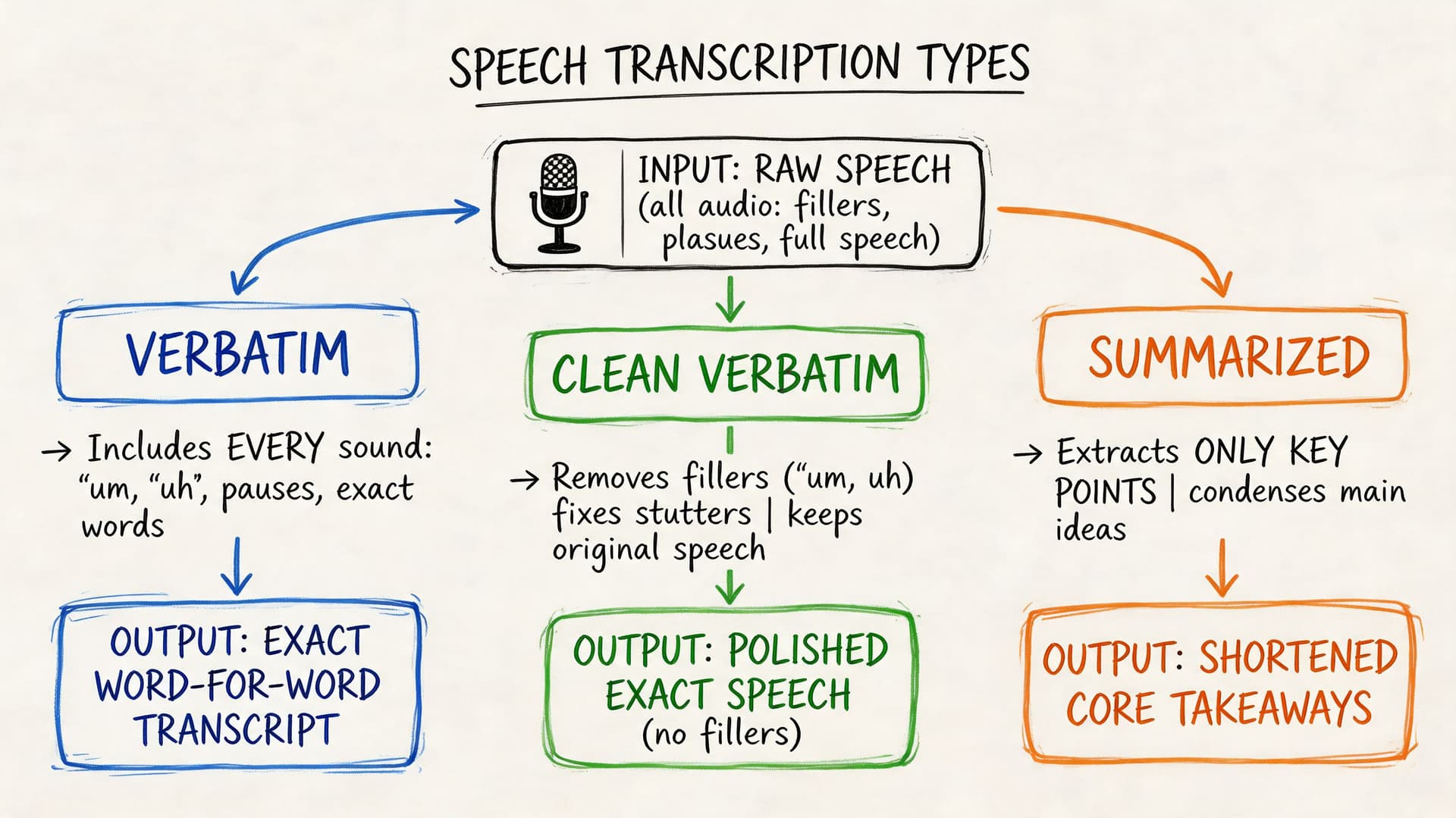
Verbatim transcription captures speech as it was spoken, including fillers, false starts, stutters, pauses, and repeated words.
That means a sentence like this:
"Um, I, I think we should probably delay the rollout."
stays close to the source instead of being polished.
This format matters when the exact wording has legal, research, or evidentiary value. If a lawyer, compliance officer, or researcher needs to know precisely what was said and how it was said, verbatim is usually the right choice.
Best fit for:
- Court matters where wording can affect interpretation
- Depositions and witness statements
- Academic or qualitative research
- Compliance reviews where omitted speech could matter
Clean verbatim or non-verbatim transcription
Clean verbatim, often called non-verbatim, removes filler words, stumbles, and repeated fragments while preserving meaning.
The same line becomes:
"I think we should delay the rollout."
This reads better and is easier to publish, subtitle, summarize, or share internally. It doesn't change the message. It just removes the noise that spoken language naturally contains.
A lot of business users want this format but don't know to ask for it. They request a transcript, then spend time cleaning it up manually because the output is too literal for the audience.
Time-stamped transcription
A time-stamped transcript links the text to specific moments in the recording. This is especially useful when someone needs to jump back to the source audio or video.
For example:
| Transcript style | Example output |
|---|---|
| Standard | We need to delay the rollout until legal signs off. |
| Time-stamped | [00:14:22] We need to delay the rollout until legal signs off. |
That small addition changes the workflow significantly.
Why teams ask for timestamps:
- Video editors can locate soundbites quickly.
- Researchers can trace quotes back to exact moments.
- Compliance teams can review disputed sections faster.
- Subtitle workflows often depend on timing metadata.
A transcript isn't finished when the words are typed. It's finished when the format matches the way your team will use the text.
A simple way to choose the right type
Use this decision logic:
- Choose verbatim if every utterance matters.
- Choose clean verbatim if readability matters more than filler words.
- Choose time-stamped output if users need to return to specific points in the media.
- Choose a combination when needed, such as clean verbatim with timestamps for production teams.
Most disappointment with transcription services comes from ordering the wrong format, not necessarily from poor transcription itself.
Human vs AI Transcription A Head-to-Head Comparison
A common enterprise scenario looks like this: a team records thousands of customer calls, board meetings, interviews, or case notes each month. The question is rarely whether those recordings should become text. The central question is which method gives you the right balance of speed, cost, and risk for the job.
That is the useful way to compare human and AI transcription. Start with the business consequence, then work backward to the workflow.
Human vs AI Transcription at a Glance
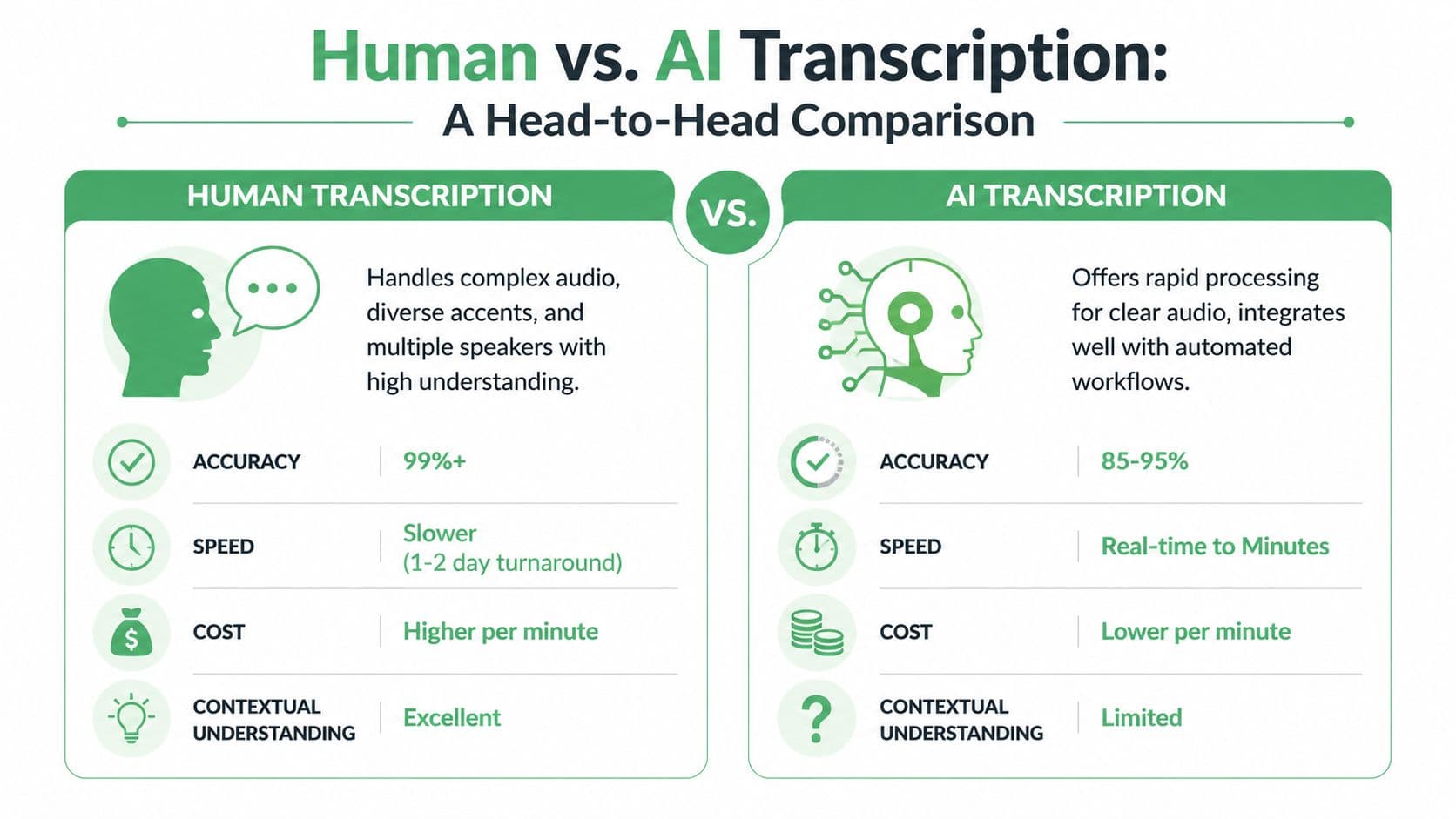
| Attribute | Human Transcription | AI Transcription |
|---|---|---|
| Accuracy | Better suited to high-stakes records where wording must be checked carefully | Depends heavily on audio quality, accents, overlap, and vocabulary |
| Speed | Slower because a person must listen, interpret, and review | Fast enough for large batches and near-real-time use cases |
| Cost structure | Labor-based, often priced per minute or hour | Software or API-based, often more efficient at scale |
| Scalability | Capacity can tighten when volume spikes | Easier to expand across many files and teams |
| Context handling | Better at nuance, ambiguity, sarcasm, and messy dialogue | Strongest when speech is clear and the output does not need fine interpretation |
| Best fit | Legal, medical, compliance, investigations, research records | Meetings, contact centers, media operations, search, analytics, draft documentation |
Where human transcription fits best
Human transcription works like manual quality inspection in manufacturing. It is slower and more expensive, but you use it when defects carry a real cost.
A trained transcriber can resolve unclear phrasing from context, distinguish similar-sounding terms, and handle interruptions better than an automated system in many difficult recordings. That matters when one misheard word can change meaning.
Use human transcription, or human review after AI, when the transcript serves as a final record. Examples include legal proceedings, sensitive medical documentation, formal investigations, and compliance reviews. In these cases, the transcript is not just reference material. It may affect a decision, an audit trail, or a dispute.
The trade-off is throughput. Human work does not scale as easily when volume rises sharply.
Where AI transcription changes the business case
AI transcription works more like automated scanning on a production line. It is built for speed, repeatability, and volume.
That makes AI a strong fit when transcripts are inputs to another system rather than the finished product. A customer support operation may need text from every call so it can search complaints, flag trends, and route cases. A media team may need rough transcripts quickly so producers can find clips. An internal meeting workflow may only need a usable first draft for notes and follow-up actions.
The value is not only lower turnaround time. AI also makes downstream automation possible. Once speech becomes text quickly, teams can feed it into summarization, tagging, QA review, analytics, or knowledge management without waiting for a manual process to finish.
If you are comparing a self-managed setup with a vendor workflow, this review of the real cost of running Whisper for in-house transcription gives a practical view of infrastructure, maintenance, and staffing considerations.
If the transcript triggers automation, AI is often the starting point. If the transcript must stand up to close scrutiny, human review usually belongs in the process.
A practical decision framework
Instead of treating human versus AI as a winner-takes-all choice, evaluate four factors.
- What is the cost of an error?
If a mistake creates legal exposure, patient risk, compliance problems, or financial rework, raise the review standard immediately. - How quickly does the transcript need to be available?
Real-time coaching, live captions, same-day meeting notes, and high-volume support workflows usually point toward AI. - What volume are you processing each week or month?
A small number of high-value recordings can justify human handling. Large recurring volumes usually require automation somewhere in the workflow. - Is the transcript the deliverable, or raw material for another task?
If people will publish it, quote it, or rely on it as the official record, quality requirements rise. If software will use it for search, categorization, or trend detection, a good first-pass transcript may be enough.
For many organizations, the strongest model is hybrid. AI handles the first pass across all content. Humans review the recordings that are high risk, hard to hear, or important enough to need tighter quality control.
That approach gives enterprises a more practical outcome than picking sides. You control cost where speed matters, and you add human judgment where mistakes are expensive.
Key Metrics for Transcription Quality and Accuracy
A procurement team is comparing two transcription vendors. Both promise "high accuracy." One looks cheaper. One looks faster. But until the team defines how accuracy will be measured on its own recordings, those claims are hard to use.
That is the practical challenge with transcription quality. A single percentage can sound reassuring, yet still hide the errors that create rework, compliance risk, or poor user experience.
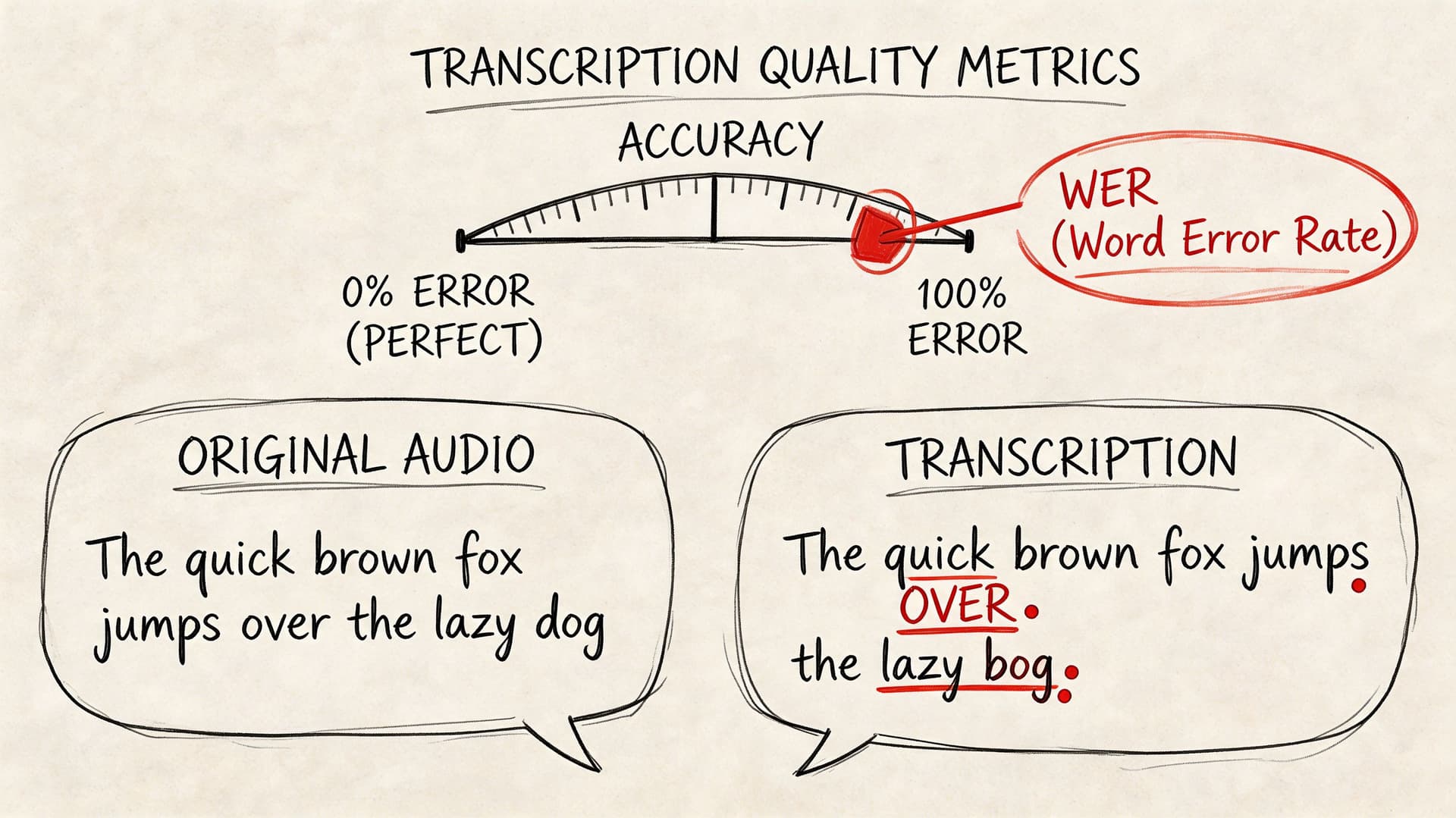
One of the standard ways to measure performance is Word Error Rate, or WER. WER compares a transcript to a verified reference version and counts three kinds of mistakes: substitutions, omissions, and insertions. Lower WER usually means better recognition quality. If you want a plain-English explanation of how that metric works, this guide to what WER means in speech-to-text breaks it down clearly.
What a quality metric should tell you
WER is useful, but it is only one lens. A transcript can score well overall and still fail the business test.
Here is why. A meeting summary can tolerate a few small wording mistakes. A legal interview cannot. A support team may care most about searchable topics and speaker turns. A clinical team may care more about medication names and abbreviations. The same transcript can be acceptable in one workflow and unusable in another.
That is why enterprise buyers should examine quality at the task level, not only at the model level.
A few failure modes matter more than headline accuracy:
- Speaker confusion can distort interviews, call reviews, and investigation records.
- Missed domain terms can break medical, legal, financial, or technical workflows.
- Weak punctuation and formatting can make the transcript harder to read, edit, and approve.
- Timestamp drift can cause problems for captions, clip review, and evidence tracking.
What affects accuracy in real use
Transcription quality depends on the recording as much as the software. Clear audio with one speaker is the easy case. Real business audio is rarely that tidy.
A useful comparison is document scanning. A clean printed page is easy to process. A crumpled photocopy with handwritten notes is not. Speech recognition works in a similar way. The model may be strong, but background noise, overlapping talk, poor microphones, and unfamiliar terminology all make the job harder.
The factors that usually affect results most are:
- Audio quality: Quiet rooms and clear microphones produce better transcripts than noisy calls or open-office recordings.
- Accent and pronunciation variation: Generic models may struggle with regional speech patterns or multilingual speakers.
- Overlapping speakers: Crosstalk makes recognition and speaker labeling harder.
- Specialized terminology: Product names, acronyms, medical terms, and legal phrases often need custom vocabulary support.
- Recording context: Phone calls, video meetings, mobile memos, and live events each create different error patterns.
One practical lesson follows from this. Better transcripts often start before the file is uploaded. Recording standards, microphone choices, meeting habits, and vocabulary setup all influence the final result.
How to evaluate quality without getting misled
Vendor demos usually use polished sample audio. Your business should not.
A stronger evaluation uses a small test set that reflects actual operating conditions. Include one clean recording, one noisy file, one multi-speaker conversation, and one file full of internal jargon. Then score each output against the criteria that matter to your process.
| Issue | Practical fix |
|---|---|
| Background noise | Record in quieter environments when possible |
| Jargon-heavy audio | Use custom vocabulary support |
| Multiple speakers | Choose software with speaker diarization |
| Video caption workflows | Require timestamps and subtitle-friendly export |
| Critical records | Add human review to the approval process |
This kind of test gives decision-makers a more reliable picture than a single marketing claim. It also helps teams spot where process changes will improve results without changing vendors.
Accuracy is really about fitness for purpose
The most useful question is not "What accuracy rate do you offer?" A better question is, "How well does the transcript perform on our audio, in our workflow, with our risk level?"
That framing leads to better buying decisions. If transcripts feed search, summaries, and trend analysis, a fast first-pass result may be enough. If transcripts become part of the formal record, quality controls should be tighter, and the evaluation standard should reflect that.
In other words, quality is not a vanity metric. It is a decision metric. The right benchmark is the one that matches the cost of error in your business.
Transcription in Action Industry Use Cases and Workflows
A director leaves a meeting with 40 customer interviews, a compliance lead has hundreds of recorded calls waiting for review, and a clinical team needs notes entered before the next shift starts. In each case, transcription only matters if the text moves work forward. A transcript is not the end product. It is an input to a larger process.
That is the practical lens enterprises should use. Start with the decision, record, or deliverable the transcript needs to support, then design the workflow around that outcome. The same speech-to-text engine can perform very differently depending on whether the job is clinical drafting, legal review, caption production, or conversation analysis.
Healthcare documentation
In healthcare, the transcript usually feeds documentation. A clinician dictates notes or records part of an encounter, and the system turns that speech into draft text for review.
Accuracy in this setting depends heavily on terminology. Medication names, procedure terms, abbreviations, and specialty language create problems for generic models. Teams evaluating transcription for healthcare should focus less on raw speed and more on vocabulary support, review steps, and how the output enters the clinical system.
A common workflow looks like this:
- Capture dictation or conversation audio
- Generate draft text
- Review medical terms and patient details
- Approve and transfer the final text into the record
That review stage matters. In healthcare, a transcript is often a starting draft, not a finished note.
Legal records and case preparation
Legal teams use transcription to create a reliable text record of interviews, depositions, hearings, and internal discussions. Here, the transcript supports analysis, search, comparison, and in some cases formal documentation.
The key decision is not just whether to transcribe. It is what level of fidelity the matter requires. If wording, pauses, interruptions, or speaker attribution could affect interpretation, verbatim output and careful review are usually the safer fit. If the transcript is only for internal issue spotting, a cleaner read may be enough.
That choice affects cost, turnaround time, and review burden. It also changes what features matter most, such as timestamps, speaker labels, and auditability.
In legal work, the transcript often functions like a searchable case file. The more risk attached to the wording, the tighter the quality controls should be.
Media production and publishing
Media teams have a different goal. They need to turn spoken content into publishable assets quickly.
A transcript in this workflow works like a production map. It helps editors find quotes, identify strong segments, create captions, and convert one long recording into multiple formats. Teams doing this regularly often pair transcription with repurposing workflows such as Fame content repurposing insights.
A typical workflow is straightforward:
- Ingest raw audio or video
- Generate a transcript with timestamps
- Mark quotes, clips, or key sections
- Create captions or subtitle files
- Turn transcript excerpts into articles, clips, or social posts
For this use case, formatting can matter as much as word accuracy. If the output does not include timestamps, speaker labels, or subtitle-friendly exports, editors end up doing manual cleanup that slows the whole pipeline.
Contact centers and customer experience
Contact centers produce a large volume of audio, which makes manual review expensive and selective. Transcription changes that by converting calls into text that supervisors, analysts, and QA teams can work with at scale.
The transcript is usually one layer in a broader system. Teams use it to search for cancellation requests, review required disclosures, identify recurring complaints, and study how agents handle difficult conversations. In this setting, transcription helps produce searchable insights, faster review cycles, and lower monitoring costs.
The workflow often looks like this:
- Record calls
- Transcribe automatically
- Route transcripts into QA, compliance, or analytics tools
- Flag calls for coaching, follow-up, or escalation
If you are choosing a solution for this environment, look closely at integration options. A strong transcript is useful. A transcript that flows directly into QA dashboards, CRM records, or analytics tools creates much more business value.
Research and internal knowledge management
Research teams, consultants, and internal operations groups often use transcription to make interviews, workshops, and meetings reusable after the conversation ends.
This is less about documentation and more about retrieval. A searchable transcript lets a team find patterns, revisit specific statements, and compare themes across multiple conversations without replaying hours of audio. For qualitative analysis, that can improve consistency and reduce the time spent hunting for evidence.
It also changes how institutional knowledge is stored. Instead of leaving important information inside recordings that few people revisit, teams can turn spoken discussions into searchable working material.
Across industries, the pattern is consistent. Good transcription workflows start with a business outcome, match the transcript format to that outcome, and add the right level of review for the risk involved.
Choosing Your Solution A Checklist for Transcription Software
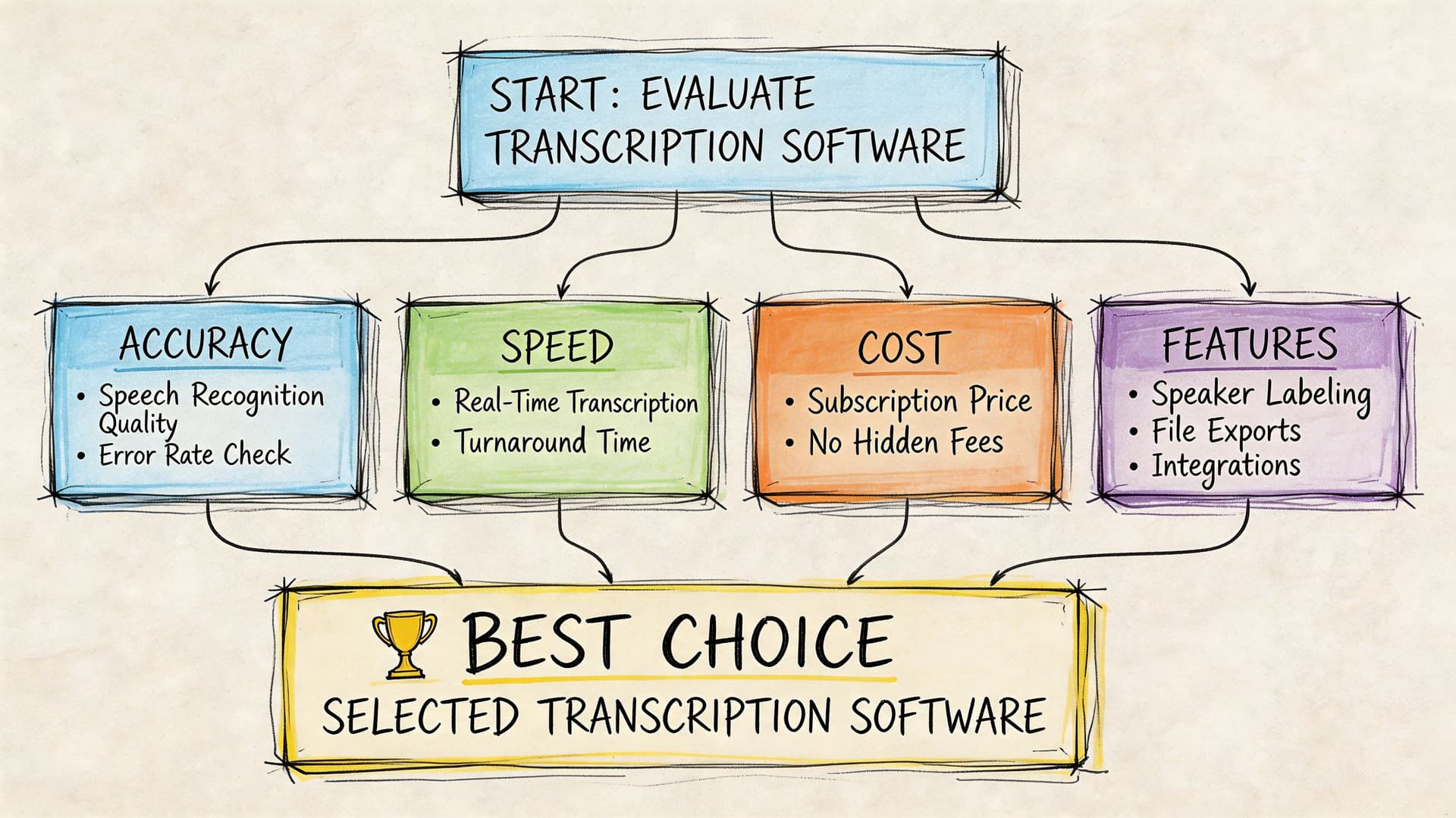
Buying transcription software gets messy when teams compare feature lists instead of use cases. One vendor emphasizes speed. Another emphasizes compliance. Another leads with captions. None of that matters unless you know which capabilities your workflow depends on.
Start by mapping the transcript to the job it has to do. Is it for subtitle creation, compliance review, searchable call archives, medical drafting, multilingual support, or product integration through an API? The right checklist looks different depending on the answer.
Start with the output requirements
Before you compare vendors, define the output your users need.
Ask these questions first:
- Do users need verbatim or clean read output?
- Do they need timestamps for editing or review?
- Do they need subtitle formats such as SRT or VTT?
- Will people read transcripts directly, or will software consume them?
- Does the workflow require summaries, redaction, or entity extraction?
This sounds basic, but it prevents a common mistake. Teams buy a speech-to-text tool that produces text, then discover they also need speaker labeling, subtitle export, editable review, or integration support that wasn't part of the plan.
Evaluate the core feature set
Not every feature matters equally. These are the ones worth checking carefully.
- Speaker diarization
This identifies who spoke and when. It matters in interviews, customer calls, hearings, and multi-speaker meetings. Without it, a transcript may be technically complete but still hard to use. - Timestamping
Time references help users jump from text back to the source recording. Essential for media, legal review, QA, and research. - Export formats
Text isn't enough if downstream teams need different file types. Media teams often need subtitle-friendly exports. Business users may want Word or PDF. Developers may want structured output for applications. - Editing workflow
A transcript usually needs some level of review. Built-in editing can save time when teams correct names, product terms, and speaker labels before sharing. - Custom vocabulary
This matters more than many buyers realize. If your team works with product names, legal phrases, acronyms, or clinical terminology, vocabulary control can materially improve usefulness.
Buying tip: Test the hardest files you have, not the cleanest. The best demo is rarely the best predictor of production performance.
Check security and deployment fit
Enterprise buying often reaches a critical juncture. A useful transcript isn't useful if legal, privacy, or IT teams can't approve the platform.
Look for alignment with your environment:
| Evaluation area | Why it matters |
|---|---|
| Data handling | Sensitive conversations may require stricter controls |
| Encryption | Important when uploading private audio and sharing outputs |
| Compliance posture | Relevant for regulated sectors and procurement reviews |
| Deployment options | Some organizations need private cloud or on-premise models |
| Access control | Teams need role-based review and restricted visibility |
Healthcare, legal, government, and enterprise contact center buyers usually need these conversations early, not after a pilot succeeds.
Consider workflow expansion, not just transcription
Once teams have transcripts, they usually want more. Search. Summaries. Highlights. Captions. Analytics. Repurposed content. This is why it helps to choose software that supports the next step, not just the first one.
For media and marketing teams, transcripts often become raw material for derivative assets. If that matters in your organization, these Fame content repurposing insights are a practical companion because they show how one source conversation can support articles, clips, social posts, and other downstream content formats.
A product option in this category is Vatis Tech, which provides AI transcription software and an API with features such as speaker diarization, timestamps, editable transcripts, subtitle exports, custom vocabulary, PII redaction, and deployment options for teams that need tighter security controls.
Don't skip the developer and operations checklist
If the transcript will enter a product, workflow engine, or internal system, your technical team needs more than a UI.
Check for:
- API documentation quality
- SDK availability
- Webhook or async processing support
- Error handling and retry patterns
- Scalability for batch or streaming workloads
- Support for multilingual use cases
A short product walkthrough can help non-technical stakeholders understand what to ask during evaluation:
A shortlist checklist you can actually use
Use this when comparing providers:
- Sample accuracy on your real files
- Support for your needed transcript type
- Speaker labeling and timestamps
- Required export formats
- Security and compliance fit
- Custom vocabulary or domain adaptation
- Editing and review workflow
- API and developer readiness
- Scalability for your volume
- Clear path from pilot to production
The best choice isn't the tool with the longest feature page. It's the one that matches your transcript risk level, workflow complexity, and operational constraints.
Frequently Asked Questions about Transcription
How long does it take to transcribe one hour of audio
A familiar planning mistake is assuming a one-hour recording takes about an hour to turn into usable text. In practice, the answer depends on who is doing the work and what "finished" means.
Human transcription usually takes several hours for each hour of audio, especially if the recording includes accents, background noise, technical terms, or multiple speakers. AI transcription can return a draft in minutes or near real time. That speed is valuable for operations teams that need quick access to meeting notes, support calls, or interview content. If the transcript will support compliance, formal records, or customer-facing outputs, review time still needs to be part of the schedule.
What's the difference between transcription and translation
Transcription converts speech into text in the same language.
Translation converts meaning from one language into another.
If your sales call is in English and you need written English, that is transcription. If the same call needs to become written French for a regional team, translation is a separate step. Some platforms support both, but they solve different business problems and should be evaluated separately during procurement.
Can transcription software handle multiple speakers
Usually, yes. The feature to look for is speaker diarization, which labels who spoke and when.
Accuracy depends heavily on the recording itself. A structured board meeting with clear turn-taking is much easier than a fast-moving workshop, a cross-talk-heavy panel, or a noisy contact center call. During evaluation, ask vendors to process real files from your environment instead of polished samples. That gives you a much better view of whether speaker labels will hold up in daily use.
What makes a transcript accurate enough for business use
"Accurate enough" is a business decision before it is a technical one. The right benchmark depends on the cost of getting a word, speaker, or timestamp wrong.
A rough internal summary can tolerate more errors than a legal transcript, a clinical note, or an earnings-call record. A simple way to decide is to match the review process to the risk level:
- Low-risk use cases can often use AI output as a first draft with light cleanup.
- Moderate-risk use cases usually need editor review, approval steps, or spot checks.
- High-risk use cases often require stricter QA, specialist reviewers, or human transcription from the start.
Buying criteria become important at this stage. Teams should define acceptable error types, turnaround targets, and review ownership before rollout. Without that, "accuracy" stays subjective and projects stall.
Is verbatim always better
No. It depends on what the transcript needs to do.
Verbatim transcripts capture filler words, false starts, pauses, and repeated phrases. That level of detail helps when wording itself matters, such as legal review, research analysis, or media production. Clean verbatim removes distractions and makes the text easier to read, which is often better for internal documentation, knowledge management, and meeting records.
If people need to jump back to exact moments in the source audio, timestamps matter more than strict verbatim formatting.
Vatis Tech is one option to evaluate if your team needs AI speech-to-text software or an API for turning audio and video into editable transcripts, captions, and structured outputs. It includes features such as speaker diarization, timestamps, export formats, and developer tools for production use.