What Is Speech to Text? a Complete Guide for 2026
Speech to text turns audio into searchable text. How the models work, what word error rate measures, which features matter, and where accuracy breaks down.
12 min read
•
May 22, 2026
Written by
Adrian Ispas
Speech-to-text is an AI technology that converts spoken words into written text. Its core purpose is to turn audio into searchable, analyzable data so teams can find information faster, review conversations more easily, and build workflows around what was said.
If you're sitting on a pile of meeting recordings, support calls, interviews, webinars, or voicemail, you already know the main problem isn't just capturing audio. It's that audio is hard to scan, hard to search, and expensive to review manually.
That's why people ask, "What is speech to text?" but usually mean something more practical. They want to know how spoken language becomes usable business information. They want to know whether the output will be accurate enough, fast enough, and structured enough to support real work.
What Is Speech to Text and Why Does It Matter
Speech-to-text, often shortened to STT, is the practical application of automatic speech recognition. It listens to spoken language and produces written text. At a basic level, that sounds simple. In practice, it changes how teams handle voice data.
Think about what happens in most organizations. Calls are recorded. Meetings are stored. Interviews are archived. Podcasts, lectures, and compliance conversations pile up. But unless someone listens back and takes notes, that content stays trapped in audio form.
That creates an "audio overload" problem.
Why raw audio creates friction
A one-hour recording might contain customer objections, legal risk, product feedback, medical detail, or a key decision. But no one wants to scrub through the whole file to find one sentence. Text changes that.
Once speech becomes text, teams can:
- Search faster: Find a name, topic, phrase, or commitment without replaying the entire file.
- Review at scale: Scan many conversations in a fraction of the time it would take to listen manually.
- Reuse content: Turn spoken material into notes, captions, highlights, summaries, and workflows.
- Analyze patterns: Spot recurring issues, common requests, or repeated compliance language.
If you're weighing whether voice is faster than typed input in the first place, this breakdown of compare talking vs typing gives helpful context for why spoken input keeps gaining traction in everyday workflows.
Why the category keeps growing
Speech-to-text matters because organizations increasingly treat voice as data, not just media. According to market reporting for 2026, the global speech and voice recognition market was estimated at USD 14.0 billion in 2022 and is projected to rise to USD 83.0 billion by 2032, reflecting a reported 20% CAGR (speech and voice recognition market reporting).
That growth aligns with what teams are doing on the ground. Contact centers want searchable calls. Healthcare teams want faster documentation. Broadcasters want captioning and archive access. Product teams want speech-enabled apps.
Speech-to-text matters because it turns conversations from something you store into something you can operate on.
For readers who want a clearer foundation on the terminology, this explainer on what ASR means is useful because STT and ASR are closely related in day-to-day product discussions.
How Speech to Text Technology Actually Works
The easiest way to understand speech-to-text is to think about how a skilled human listener works.
A person doesn't hear speech as one giant block. They separate sounds, use context, infer likely words, and resolve ambiguity from the rest of the sentence. STT systems do something similar, but mathematically.
The basic pipeline
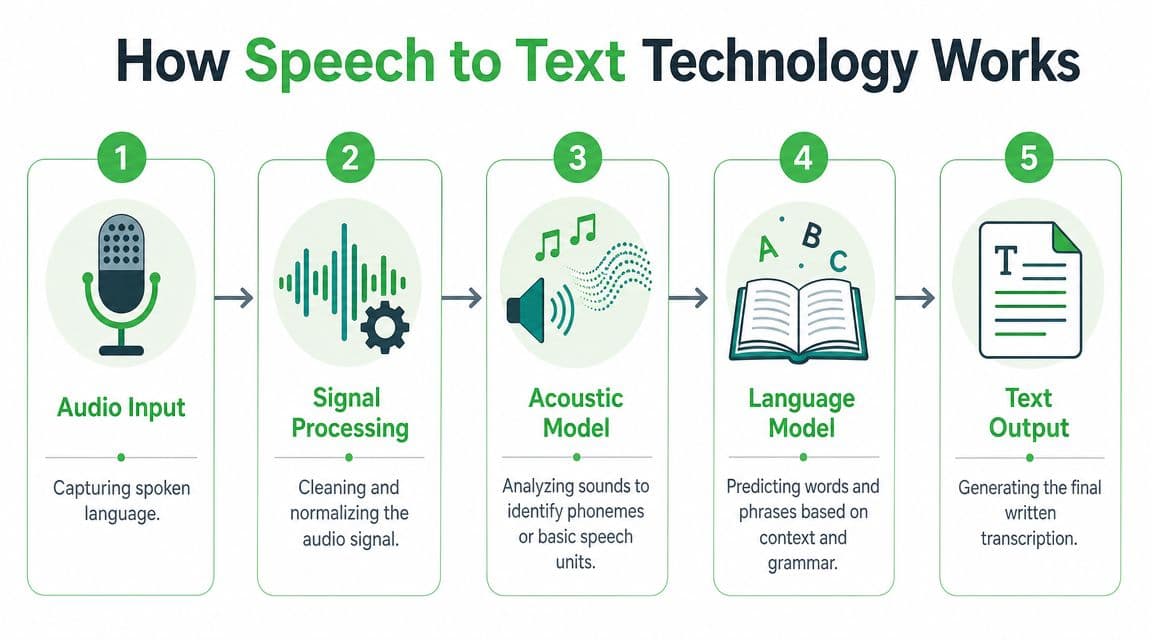
IBM describes modern STT as a pipeline: speech input, feature extraction, decoding with acoustic and language models, and word output, with a practical tradeoff between synchronous real-time processing and asynchronous batch transcription for longer files (IBM overview of speech-to-text).
Here is that pipeline in plain language:
- Audio input
A microphone or uploaded file provides the raw speech signal. - Signal processing
The system cleans and normalizes the audio. This process involves noise reduction and preparation. - Feature extraction
Instead of treating audio like a simple waveform, the model turns it into patterns that help represent the sounds of speech. - Acoustic modeling and decoding
The system estimates which speech sounds are most likely present at each moment. - Language modeling
It uses context to decide which word sequence makes the most sense. - Text output
The final result appears as readable text, often with punctuation and formatting.
Core idea: STT doesn't "hear" words the way people do. It estimates the most likely word sequence from an audio signal.
Why language models matter
Take a simple example. If the audio is unclear, the system might hear something close to "their," "there," or "they're." The sound alone may not be enough. Context helps the model choose the most plausible option.
That's why speech recognition isn't only about matching sounds. It's also about predicting meaning from surrounding words.
A good mental model is autocorrect for spoken language. The acoustic model guesses what sounds were spoken. The language model asks, "Given the sentence so far, what word probably fits here?"
For a more technical walkthrough, this guide to the ASR pipeline step by step breaks down the underlying stages in more detail.
Real time versus batch
Not every STT use case needs the same processing mode.
| Mode | Best for | What matters most |
|---|---|---|
| Streaming or real time | Live captions, call monitoring, voice assistants | Low latency |
| Asynchronous or batch | Interviews, archive media, recorded meetings | Throughput and full-file processing |
A contact center supervisor may want words to appear while a customer is still speaking. A newsroom transcribing an hour-long interview usually cares more about completeness and editability than instant output.
A short demo helps make the workflow feel less abstract:
Where structure starts to appear
Modern systems often do more than return a wall of text. They can also attach timestamps and speaker labels.
That matters because raw transcription alone still leaves cleanup work. If a meeting transcript says ten paragraphs of text with no indication of who spoke or when, review is still painful. If the transcript shows "Speaker 1," "Speaker 2," and time markers, the recording becomes easier to work with, quote, audit, and summarize.
Understanding and Evaluating STT Accuracy
A common first question is simple: "How accurate is it?" The problem is that accuracy gets discussed too casually.
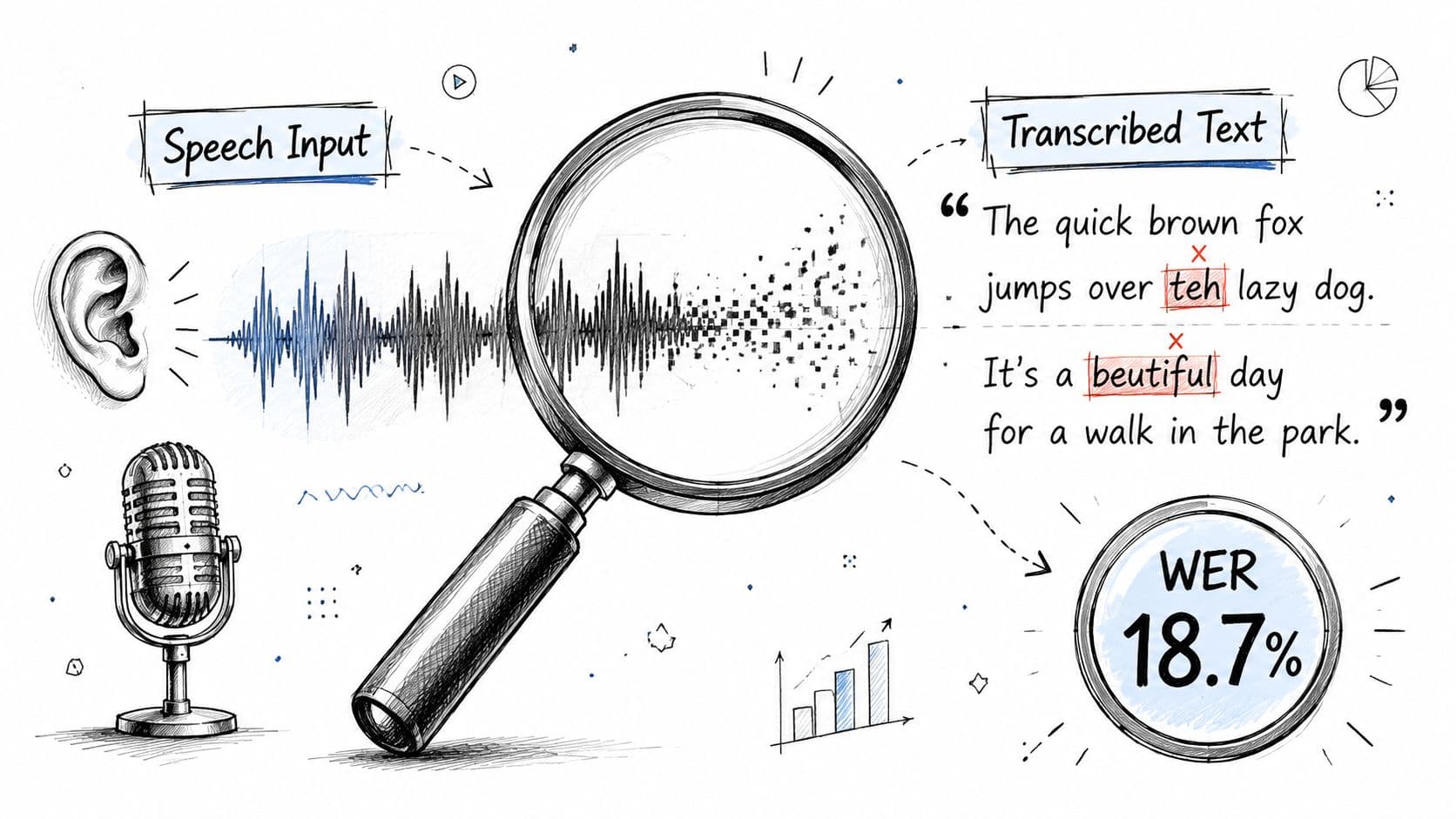
In speech-to-text, the standard metric is word error rate, or WER. It doesn't ask whether the transcript feels mostly right. It measures how many word-level mistakes appear compared with a correct reference transcript.
What WER actually means
WER is calculated as (substitutions + deletions + insertions) / total reference words. A 2023 study also found that performance is highly dataset-dependent, with no single model best across all audio types. The main drivers were dataset variability, model architecture, and training data domain (2023 ASR benchmark study).
That formula sounds technical, but the parts are straightforward:
| Error type | What it means | Example |
|---|---|---|
| Substitution | The system writes the wrong word | "call" instead of "fall" |
| Deletion | The system misses a word entirely | leaves out "not" |
| Insertion | The system adds a word that wasn't spoken | adds "the" where none existed |
A practical example
Suppose the reference sentence is:
"Please send the signed contract today."
Now imagine the transcript says:
"Please send signed contact today."
That includes:
- One deletion because "the" is missing
- One substitution because "contract" became "contact"
If the sentence has five reference words, those two errors count against the total. That's what WER captures.
A transcript can look readable and still perform poorly on WER if it drops key words or substitutes terms that change meaning.
This matters a lot in healthcare, legal, compliance, and support settings. Missing one medication name, account term, or negation can be much more serious than a typo in a casual meeting note.
Why "accuracy" changes by use case
The benchmark finding that no single model wins across every dataset should reset expectations. There isn't one universal number that tells you whether a system will work for your audio.
Real performance depends on factors like:
- Audio quality: Distortion and compression make recognition harder.
- Background noise: Office chatter, traffic, or call-center overlap increase confusion.
- Speaking style: Read speech is usually easier than spontaneous conversation.
- Accents and pronunciation: Variation can shift results substantially.
- Domain vocabulary: Industry-specific terms often need adaptation.
If you need a deeper primer on the metric itself, this guide to what WER means in speech-to-text is a useful reference when comparing vendors or internal models.
Key Features Beyond Basic Transcription
Most explainers stop at "speech becomes text." That was enough when the product category looked like digital dictation. It isn't enough now.
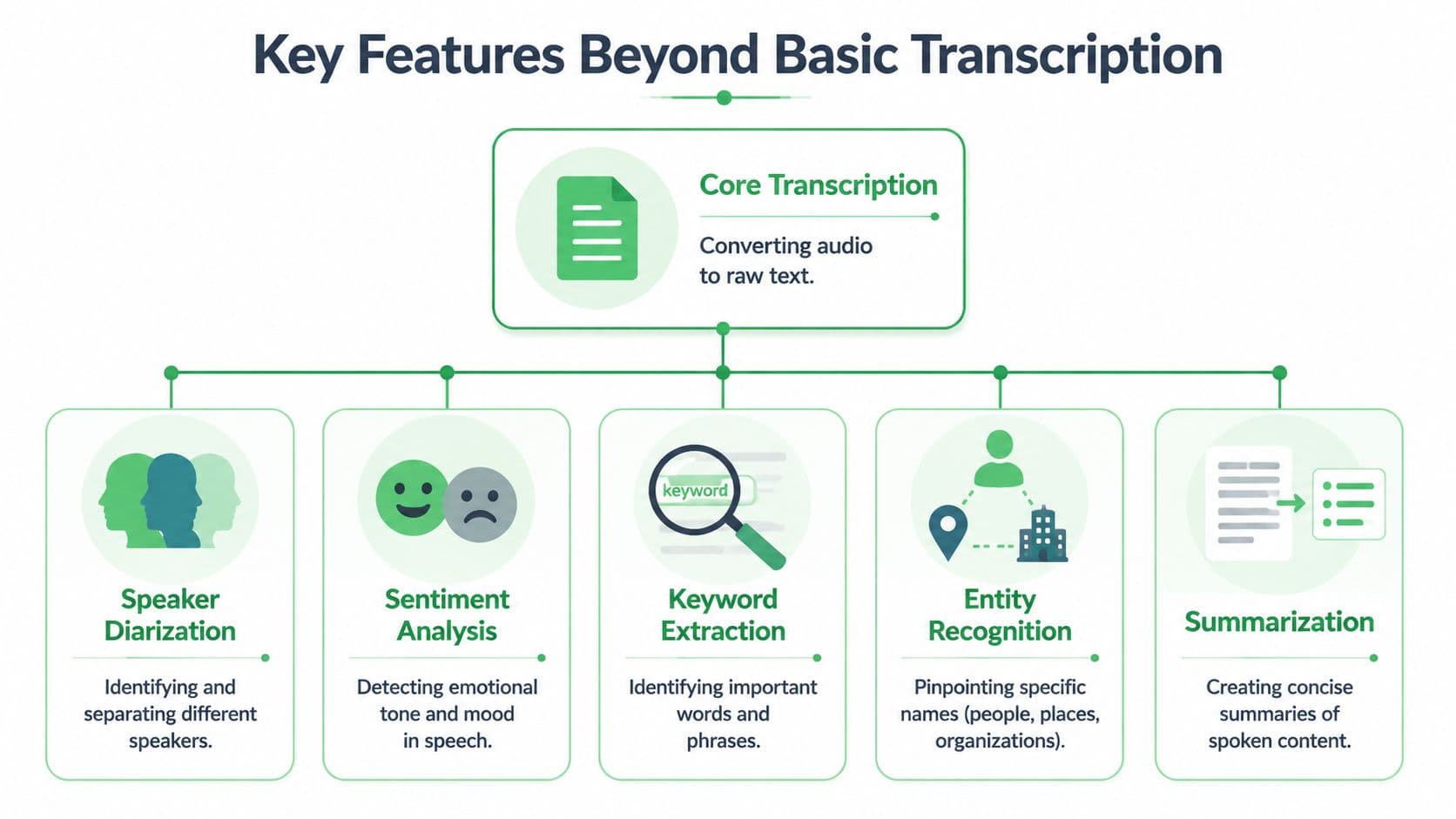
The market is moving from transcription to structured understanding. Microsoft highlights capabilities such as real-time, fast, batch, and custom speech, and the broader category increasingly emphasizes summaries, chapters, speaker labels, and searchable metadata rather than plain text alone (Microsoft speech-to-text overview).
Speaker diarization and timestamps
A raw transcript from a sales call might read like one continuous paragraph. That isn't very useful if the manager needs to know who promised what.
Speaker diarization separates the conversation by speaker. Timestamps show when each segment happened.
Before:
- One block of text
- No separation between customer and agent
- Hard to find the pricing discussion
After:
- Speaker 1 and Speaker 2 are split
- Time markers point to the exact moment an objection appeared
- Reviewers can jump directly to the relevant clip
For contact centers, that means faster QA review. For journalists, it means easier quote verification. For legal teams, it means cleaner navigation through long recordings.
Summaries, chapters, and metadata
The next layer is organization.
A long interview or internal meeting often doesn't need line-by-line reading first. Teams need a quick map. That's where summary and chapter features help. The system can turn a messy recording into a high-level structure such as opening discussion, budget review, product issues, and next steps.
That changes the user experience from "read everything" to "scan, then dive deeper."
Structured output is what makes transcription operational. Text alone is useful. Text with labels, sections, and metadata is workflow-ready.
PII redaction and extracted entities
Some recordings contain sensitive information such as names, account details, contact information, or health-related data. In those situations, the goal isn't only recognition. It's safe handling.
A platform may detect sensitive terms and apply PII redaction, which helps teams share or review content without exposing every detail. Some systems also identify entities such as people, organizations, products, or locations. That turns a transcript into something closer to an indexed record.
Before:
- "Call me at..." appears in the transcript
- Manual cleanup is required before sharing
After:
- Sensitive details are masked
- The transcript is easier to route across operations, QA, or research teams
Searchability becomes business intelligence
Once speech is labeled, segmented, timestamped, summarized, and cleaned, it starts acting less like a transcript and more like a data source.
That is the bridge from audio storage to business intelligence:
- Customer conversations become trend inputs
- Interviews become searchable research archives
- Broadcast footage becomes reusable newsroom material
- Internal meetings become traceable decisions
Practical Use Cases for Speech to Text
Speech-to-text becomes easier to evaluate when you look at the job it performs in a real workflow. Different teams don't buy STT for the same reason. They buy it to remove a bottleneck.
Speech-to-text applications by sector
| Industry | Primary Use Case | Key Business Benefit |
|---|---|---|
| Contact centers | Transcribing calls for QA, compliance review, and coaching | Faster review and easier search across conversations |
| Media and broadcasting | Captioning live or recorded content and indexing archives | Better accessibility and faster reuse of media assets |
| Healthcare | Converting dictated notes and conversations into documentation | Less manual admin work and more usable records |
| Legal | Transcribing interviews, depositions, and hearings | Easier review, reference, and case preparation |
| Education | Converting lectures and recorded classes into text | Improved accessibility and study support |
| Research and journalism | Turning interviews into searchable transcripts | Quicker quote retrieval and analysis |
| Product and developer teams | Adding voice input or transcript search to applications | New product capabilities and automation options |
What this looks like in practice
In a contact center, a supervisor rarely wants to listen to every call from start to finish. They want to find refund disputes, cancellation requests, escalation language, or moments where an agent skipped a required phrase. Searchable transcripts make that review process much more manageable.
If your workflow includes missed calls and recorded messages, guides that explain how to enhance lead capture with voicemail are useful because voicemail-to-text often becomes the first step in a broader STT workflow.
In media, the value is different. A broadcaster may need captions during a live segment, then searchable archives later. The same interview can support accessibility, editorial research, and clipping for future coverage.
Healthcare teams usually care less about a polished transcript and more about documentation speed and retrievability. A physician's spoken notes need to become structured records that can be reviewed and edited without starting from a blank screen.
Why the same core technology serves different teams
The underlying engine may be similar, but the output requirements change:
- Customer experience teams need searchable calls and speaker separation.
- Legal teams need traceable transcripts and navigable timestamps.
- Educators need accessible notes students can review.
- Developers need APIs that can feed transcripts into other systems.
One product manager's rule of thumb is useful here: don't ask only whether the system can transcribe. Ask what the transcript lets your team do next.
Choosing and Integrating the Right STT Solution
A good STT choice starts with a simple question: what needs to happen after the words are transcribed?
That question changes the evaluation. If a support team needs to find cancellation language, route urgent calls, and remove sensitive data before storage, plain text is not enough. If a media team needs live captions now and a searchable archive later, latency and timestamp quality matter as much as transcription quality. If a compliance team needs reviewable records, speaker separation, redaction, and audit controls rise quickly on the priority list.
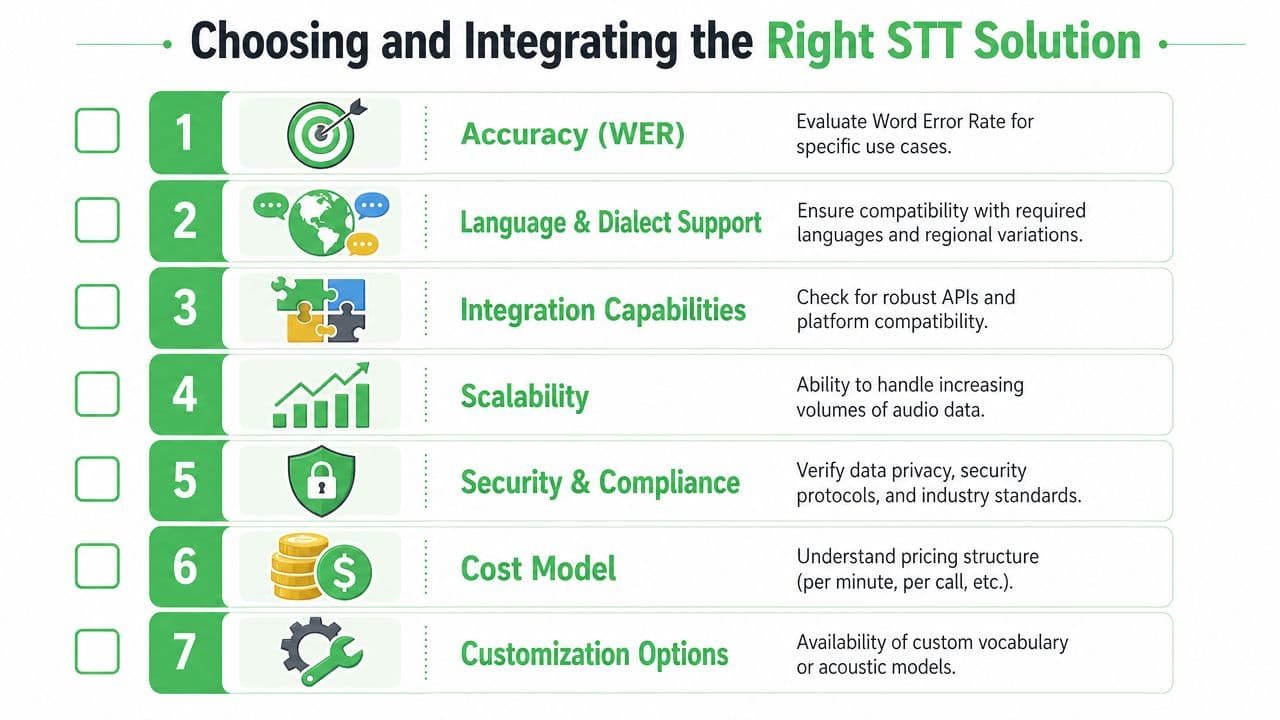
A practical evaluation checklist
- Accuracy for your audio: Test with your own recordings, not only polished demos. Contact center calls, webinars, interviews, and meetings each create different failure modes.
- Real-time versus batch support: Match the system to the speed your workflow requires. Live assistance and captions need low latency. Back-office processing often cares more about throughput and editability.
- Language and vocabulary fit: Specialized terms, acronyms, product names, and mixed-language speech can break generic models.
- Structured output: Look for diarization, timestamps, summaries, redaction, and metadata. These features turn a transcript into something your team can search, review, and analyze.
- Integration path: APIs, SDKs, webhooks, and export formats determine how quickly transcripts can flow into CRM, QA, analytics, or documentation systems.
- Security and compliance posture: Review storage, encryption, access controls, retention options, and deployment model.
- Editing workflow: High-stakes transcripts usually need human review. Fast correction tools save more time than a slightly prettier raw transcript.
How to prioritize criteria
A useful way to rank vendors is to start with the mistake your team cannot afford.
For a legal workflow, a missing speaker change can distort who said what. For a voice product, delayed streaming can make the experience feel broken. For a healthcare or compliance workflow, weak redaction can create handling risk before anyone reads the transcript. The best choice usually becomes clearer once you define that failure case.
Another way to frame it is to treat STT like a data pipeline, not a typing service. The audio is the raw input. The transcript is an intermediate layer. Business value shows up when that output becomes structured data your systems can act on, such as speaker-labeled conversations, timestamped review points, searchable topics, and redacted records that can move safely into downstream tools.
Some teams compare vendors with in-house builds. Others prefer an off-the-shelf platform that already includes the workflow pieces around transcription. Vatis Tech is one example, with a speech-to-text web app and API that includes editable transcripts, speaker diarization, timestamps, summaries, chapters, and PII redaction. The best fit depends on whether you need a no-code workflow, developer tooling, enterprise controls, or a mix of all three.
If you are building an initial shortlist, this 2026 voice transcription guide is a useful market scan before you run tests on your own audio.
Frequently Asked Questions About Speech to Text
Can speech-to-text handle accents and different speaking styles
Yes, but results vary. Accent, speaking pace, domain vocabulary, and whether the speech is read or spontaneous all affect performance. The most reliable way to evaluate fit is to test the system on your own recordings.
What happens when the audio quality is poor
Performance usually drops when the recording has noise, distortion, crosstalk, or overlap. That's because the model has less reliable signal to work with. In operational terms, better microphones and cleaner source audio often improve outcomes as much as switching tools.
Is speech-to-text only useful for transcription
No. The more useful question is what the transcript becomes after generation. In many business settings, the primary value comes from speaker labels, timestamps, summaries, chapters, metadata, and redaction that make the content searchable and reviewable.
Is real-time speech-to-text always better than batch transcription
Not always. Real-time is important for live captions, call assistance, and voice interfaces. Batch processing is often a better fit for longer recordings when throughput and editability matter more than immediate output.
Do teams still need human review
Often, yes. Especially in legal, medical, compliance, or high-stakes customer workflows, human review remains important for correcting terms, verifying meaning, and approving final records.
How should I test an STT system before rollout
Use a representative sample of your actual audio. Include the hard cases, such as poor call quality, overlapping speakers, specialized terminology, and varied accents. Then evaluate not only the transcript itself, but also how easy it is to search, edit, export, and use downstream.
If you're evaluating speech-to-text for contact centers, media, healthcare, legal, or product workflows, Vatis Tech is worth reviewing as one option. It supports turning audio and video into editable transcripts and structured outputs that help teams search, analyze, and act on spoken content more efficiently.