Best Video to Text Converter Tools in 2026 (Free & Paid)
Seven video-to-text tools compared on accuracy, language count, speaker labels, SRT export and price — including what each free tier actually covers.
7 min read
•
June 23, 2026
Written by
Maria Carp
The Best Video-to-Text Transcription Tools in 2026 (Free & Paid)
Turning a video into clean, editable text used to mean either hours of manual typing or a hefty bill for human transcribers. In 2026, AI has changed the math. The best video to text converter can now process an hour of footage in minutes, label who said what, and hand you a subtitle file ready to drop into your editor — often for free.
But "video to text" means different things to different people. A podcaster wants editable transcripts. A marketer wants SRT subtitles. A developer wants a transcription API they can call at scale. The right tool depends on what you're actually trying to do, so this guide reviews the strongest options across those use cases — honestly, including where each one falls short.
What to look for in video transcription software
Before the roundup, here's what actually separates good video transcription software from the rest:
- Accuracy. Anything below ~90% on clean audio means heavy manual cleanup. The best tools advertise 95–99% on clear recordings.
- Language coverage and auto-detect. If you work in more than one language, look for broad support and automatic language detection so you're not setting it manually each time.
- Speaker labels (diarization). For interviews, panels, and meetings, automatic speaker separation saves enormous editing time.
- Subtitle and SRT/VTT export. If your goal is captions, you need timed exports (SRT, VTT), not just a wall of text.
- Word-level timestamps. Click-to-play timestamps make reviewing and correcting transcripts far faster.
- Pricing model. Some tools are flat monthly subscriptions, some are pay-per-minute, some bill via API usage. Match the model to your volume.
Comparison at a glance
ToolBest forFree tier?Key strengthTranscribe Video to TextFree, accurate browser video transcriptionYes (3 min no signup, 30 min free account)99% accuracy, 100+ languages, SRT/VTT exportTurboScribeHigh-volume individual transcriptionYes (3 files/day)Unlimited paid plan, 98+ languagesNottaMeeting & real-time transcriptionYes (120 min/mo)Live capture, summaries, integrationsHappyscribeHybrid AI + human-grade accuracyTrial only (10 min)Optional human transcription, subtitle workflowDescriptEditing video through its transcriptYes (1 hr/mo)Text-based audio/video editingRevPremium human-accuracy transcriptsLimited free99%+ human transcription optionVatis TechDevelopers & teams needing an APIYes (free tier)Speech-to-text API, on-prem deployment
Transcribe Video to Text — best free pick for accurate video transcription
If your goal is simply to drop a video in and get an accurate transcript back without paying or installing anything, Transcribe Video to Text is the standout free option in 2026. It's a browser-based AI tool built on the Vatis speech-to-text engine, and it focuses on doing one thing well: converting video (and audio) into clean, exportable text.
The accuracy is the headline. It targets 99% accuracy on clear audio and supports 100+ languages with automatic detection, so you don't need to specify the language up front. It also handles automatic speaker labels (diarization), which is often a paid-only feature elsewhere, and gives you word-level, click-to-play timestamps for fast review and correction.
For getting work out the door, it exports to TXT, PDF, SRT, and VTT — meaning it covers both plain transcripts and timed subtitle files in the same tool. It accepts common video formats (MP4, MOV, WebM, MKV) plus audio (MP3, WAV, M4A), and runs entirely in-browser.
On pricing, you can try the first 3 minutes with no signup, a free account unlocks 30 minutes, and the Pro plan is $12/month for 20 hours — which is competitive for the accuracy and feature set you get.
Pros:
- Genuinely free to start (no signup for a quick test), with strong 99% accuracy
- Speaker labels, 100+ languages, and PDF, TXT, DOCX, SRT/VTT export included
- Simple, no-install browser workflow with click-to-play timestamps
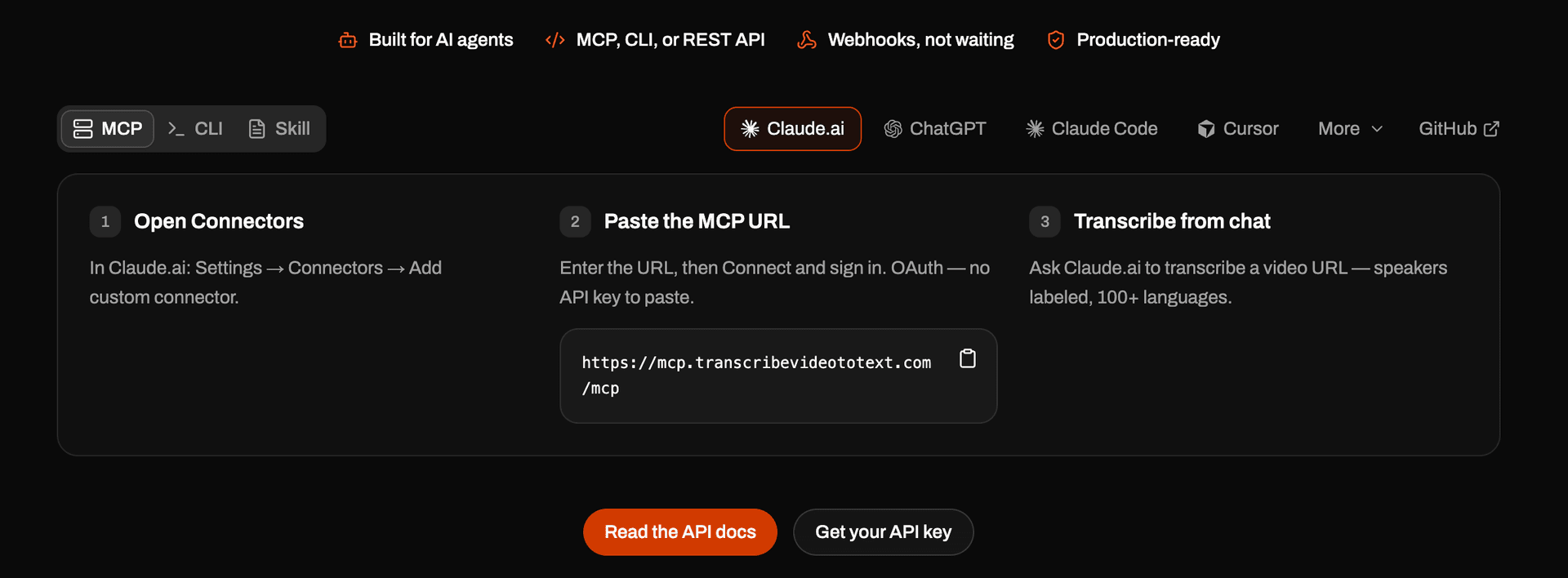
- Connect to Claude Code, Cursor, Codex, and Claude Desktop — or any agent — and transcribe video to text right from your chat. 100+ languages, speaker labels, and webhooks included.
TurboScribe — strong value for high-volume individuals
TurboScribe is a popular pick for people who transcribe a lot and want predictable costs. It converts audio and video to searchable text with advertised accuracy around 99.5% on clean audio, automatic speaker detection, timestamps, and support for 98+ languages, with exports to DOCX, PDF, SRT, and TXT.
The free tier allows 3 transcripts per day with a 30-minute cap per file. The Unlimited plan removes those limits and supports long files — pricing is roughly $10/month billed annually (around $20 month-to-month).
Pros:
- Effectively unlimited transcription on the paid plan
- Broad language support and useful export formats
- Simple, transcription-first interface
Cons:
- The free tier's daily cap is restrictive for batch work
- No deeper editing or collaboration features
Notta — best for meetings and real-time capture
Notta leans toward live meeting transcription rather than file-based video work, though it handles uploads too. It can capture and transcribe meetings in real time, generate AI summaries, and integrate with calendar and conferencing tools, which makes it a fit for teams documenting calls.
Its free plan includes around 120 transcription minutes per month with a short per-file cap; the Pro plan (about $13.99/month, lower on annual billing) raises the monthly minute allowance substantially and unlocks full exports.
Pros:
- Excellent for live meetings and recurring calls
- AI summaries and integrations beyond raw transcription
- Reasonable free allowance for light users
Cons:
- The free plan's per-file cap limits longer videos
- More meeting-oriented than pure video-to-text
Happyscribe — AI plus optional human accuracy
Happyscribe is built around a subtitle and transcription workflow, and its differentiator is the option to escalate from AI to human-made transcription when you need near-perfect results. Automated transcripts land in the usual AI accuracy range; human transcription is billed separately per minute (starting around $2.00/minute) and pushes accuracy toward 99%.
AI plans are subscription-based with monthly minute allowances, and there's a short free trial (around 10 minutes of AI transcription) to test it.
Pros:
- Polished subtitle editor and export workflow
- Optional human-grade accuracy for critical files
- Good fit for media and localization teams
Cons:
- Human services add up quickly at per-minute rates
- Only a brief free trial rather than an ongoing free tier
Descript — best when you want to edit the video, not just read it
Descript is less a transcription tool and more a media editor that happens to run on transcripts. You edit your audio and video by editing the text — delete a sentence in the transcript and it cuts the corresponding footage. It also offers filler-word removal, AI voice features, and screen recording.
Its free plan includes around 1 hour of transcription per month. Paid tiers (Hobbyist, Creator, Business) scale up transcription hours and unlock 4K exports and advanced AI tools, starting in the mid-$20s/month range month-to-month.
Pros:
- Uniquely powerful text-based video editing
- Strong all-in-one toolkit for podcasters and YouTubers
- Free plan to try the core workflow
Cons:
- Overkill if you only need a transcript or subtitles
- Learning curve compared to a single-purpose converter
Rev — best for premium human-accuracy transcripts
Rev is the long-standing name in transcription and offers both AI and human services. Its AI transcription is priced per minute (around $0.25/minute) with subscription plans for heavier users, while its human transcription (around $1.99/minute) delivers 99%+ guaranteed accuracy — the option to reach for when a transcript has to be exact.
A small free allowance lets you test the AI service before committing.
Pros:
- Reliable human transcription for legal, medical, or publication-grade needs
- Both AI and human options under one roof
- Captions and subtitle services available
Cons:
- Human transcription is expensive at scale
- Less compelling than newer tools if you only need AI
Vatis Tech — best for developers and teams who need an API
If you're building transcription into a product or running it at volume, you don't want a web upload page — you want an API. Vatis Tech is a speech-to-text platform aimed at exactly that: developers and teams who need accurate audio and video transcription they can call programmatically.
It offers high accuracy (in the 95%+ range on clean audio), broad multilingual support with real-time language switching, speaker diarization, custom vocabulary, and audio-intelligence features like sentiment and topic detection. Notably, it supports on-premise and private-cloud deployment, so sensitive audio can be processed without leaving your network — a real differentiator for regulated industries. Its free tier exposes the full feature set without gating.
Pros:
- Developer-first speech-to-text API with strong accuracy
- On-prem / private-cloud options for data-sensitive workloads
- Full feature access (diarization, real-time, audio intelligence) on the free tier
Cons:
- Aimed at builders — not a no-code tool for one-off transcripts
- Requires development effort to integrate
How to choose the right video-to-text tool
- You just want a free, accurate transcript or subtitles? Start with Transcribe Video to Text — no signup, SRT/VTT export, 99% accuracy.
- You transcribe huge volumes solo? TurboScribe's unlimited plan is hard to beat on cost.
- You live in meetings? Notta's real-time capture and summaries fit best.
- You need guaranteed, human-grade accuracy? Happyscribe or Rev offer human transcription.
- You're editing video, not just reading it? Descript's text-based editor is unique.
- You're a developer or team building transcription into software? Vatis Tech's API and on-prem options are the right call.
FAQ
What is the best free video to text converter? For an in-browser tool that needs no signup to try, Transcribe Video to Text is a strong free pick — it offers 99% accuracy, 100+ languages, speaker labels, and SRT/VTT export. Notta and Descript also have free tiers, though with tighter monthly or per-file limits.
How accurate is AI video transcription? On clear audio, the best tools reach 95–99% accuracy. Background noise, heavy accents, and overlapping speakers lower that, so for legal or publication-grade transcripts, a human-reviewed service like Rev or Happyscribe is safer.
Can these tools create subtitles (SRT/VTT)? Yes — Transcribe Video to Text, Happyscribe, and others export timed subtitle files directly. If captions are your main goal, confirm the tool offers SRT and VTT export specifically.
Do I need an API or a web app? If you're transcribing files yourself, a web app is simpler. If you're embedding transcription into your own product or processing audio at scale, a speech-to-text API like Vatis Tech is the better fit.