How to Get a Perfect Transcript in Spanish Your Complete Guide
Two documents share one English word. Which Spanish term you need, then how to get an accurate media transcripción in about five minutes, dialects included.
13 min read
•
March 26, 2026
Written by
Adrian Ispas
So, you need a transcript in Spanish. Simple enough, right? Not quite.
Depending on what you're actually looking for, that request can lead you down two completely different paths. In English, the word "transcript" is a bit of a chameleon—it could mean the text from a video or your official college grades. The exact same confusion exists in Spanish, and using the wrong term is a classic mistake that can waste a lot of time.
Let's clear this up right now. If your goal is to turn spoken words from an audio or video file into written text, you're looking for a transcripción. But if you need an official document from a school listing your courses and grades, you need an expediente académico.
Media vs. Academic Transcripts
Getting this distinction right is everything. A marketing team wanting to repurpose a Spanish-language webinar needs a transcripción. A student applying to a graduate program in Madrid needs their expediente académico. One is for content, the other is for credentials.
Practical Example:
- Need: You just finished a fantastic customer interview in Spanish on Zoom and want to share key insights with your team.
- You're looking for: A transcripción of the recording.
- Need: You are applying for a scholarship to study in Argentina and need to show your past coursework.
- You're looking for: An expediente académico from your previous institution.
To help you pinpoint exactly what you need, here’s a quick breakdown of the terminology.
Quick Guide to Spanish Transcript Terminology
This table breaks down the different meanings of 'transcript' in Spanish to help you quickly identify your specific need. It's a simple way to ensure you're asking for the right document from the start.
| Your Goal | Correct Spanish Term | Common Use Case | Typical Context |
|---|---|---|---|
| Convert audio/video to text | Transcripción | Transcribing a podcast or webinar | Media, Business, Legal |
| Document academic history | Expediente Académico | Applying to a university | Education, Immigration |
| Create video captions | Transcripción (for subtitles) | Making a YouTube video accessible | Digital Content, Marketing |
| Prove course completion | Certificado de Estudios | Verifying professional qualifications | Employment, Licensing |
Understanding this is more critical than ever. With over 460 million native speakers, Spanish is the second most spoken language in the world. As a result, the demand for Spanish-language content is exploding—the audio market alone grew by an incredible 75% in 2023.
This boom means a high-quality transcript in Spanish has become a powerful tool for any business looking to engage this massive audience.
Ultimately, knowing the difference between a transcripción and an expediente académico is your first step toward success. For those of you focused on media, marketing, or business intelligence, the next logical move is to explore what modern Spanish transcription services can do for you.
Choosing Your Method: Manual vs. AI Transcription
When you need a Spanish transcript, you're at a crossroads. Do you take the traditional manual path, or do you jump on the modern AI highway? It’s not a small choice. Your decision will shape everything from the final cost to how fast you get the text in your hands.
Getting this right means understanding the trade-offs.
Manual transcription is the classic approach: a human professional listens to your audio or video and meticulously types out every word. For a long time, this was the only way to reliably capture tricky dialects, subtle nuances, or conversations buried in poor-quality audio. But that human touch comes with a hefty price tag, both in time and money.
On the other hand, you have AI transcription. These are powerful algorithms that convert speech to text automatically. A service like Vatis Tech can chew through hours of audio in just minutes, which is a game-changer for speed. While early AI often stumbled, today's systems deliver accuracy that can go toe-to-toe with human transcribers, all at a fraction of the cost.
This flowchart can help you see which path makes the most sense depending on what you're starting with—media files or academic documents.
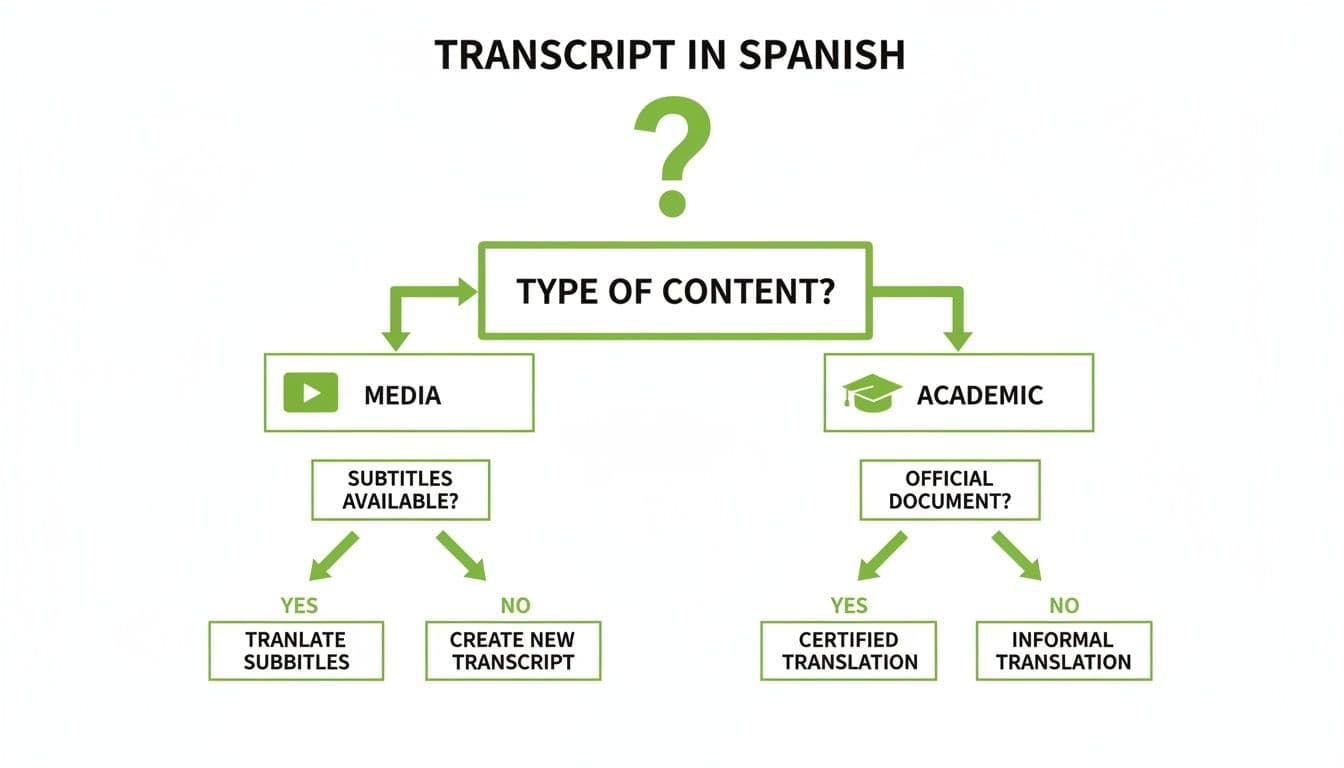
As you can see, your starting point really does set the course for the entire process and even the specific terms you'll need to use.
Speed and Cost: The Deciding Factors
Let’s get practical. Say you have a 30-minute Spanish podcast episode to transcribe. Here’s how the two methods stack up.
| Feature | Manual Transcription | AI Transcription (Vatis Tech) |
|---|---|---|
| Time to Complete | 2–3 hours (or more) | Under 5 minutes |
| Estimated Cost | $45 – $150+ | A few dollars |
| Best For | Highly sensitive legal depositions with poor audio, nuanced artistic performances. | Business meetings, podcasts, interviews, marketing content, academic research. |
The cost difference is just as dramatic. Manual transcription rates can run anywhere from $1.50 to $5.00 per audio minute. For that same 30-minute podcast, you’re looking at a bill between $45 and $150. AI services, in contrast, often charge just pennies per minute, making it a far more scalable and budget-friendly option, especially if you have a lot of content.
For any project where speed and budget are the top priorities, AI transcription is the undisputed winner. Getting accurate text almost instantly lets your team move faster on everything that comes next, from analysis to content creation.
Accuracy and Nuance: A Head-to-Head Comparison
So, AI is faster and cheaper. But what about accuracy? This is where the line between human and machine has become incredibly blurry.
- Manual Transcription: A skilled human is still fantastic at untangling overlapping speakers, deciphering heavy accents, and catching niche industry jargon. Their real strength is in contextual understanding, which remains critical for things like legal depositions or sensitive medical records.
- AI Transcription: The best AI platforms now hit over 98% accuracy on clear audio. These systems are trained on a huge variety of Spanish dialects and can automatically add timestamps and even identify who is speaking (a feature called diarization), things you often pay extra for with manual services.
For the vast majority of business needs—like transcribing meetings, interviews, or creating content from media files—today's AI delivers more than enough precision. It gives you a powerful, efficient way to get the job done without having to sacrifice quality.
Best Practices for a High-Quality Spanish Transcript
A raw text file from an audio recording is just a jumble of words. A well-structured transcript, on the other hand, is a strategic asset. To create a high-quality transcript in Spanish that’s genuinely useful, you have to do more than just convert speech to text. A few key practices can transform that messy block of content into a polished, organized document ready for analysis, content creation, or legal review.
The first move is getting away from a simple wall of text. This is absolutely critical for any audio or video with more than one person, like an interview, webinar, or team meeting. Without clear organization, trying to follow the conversation is nearly impossible.
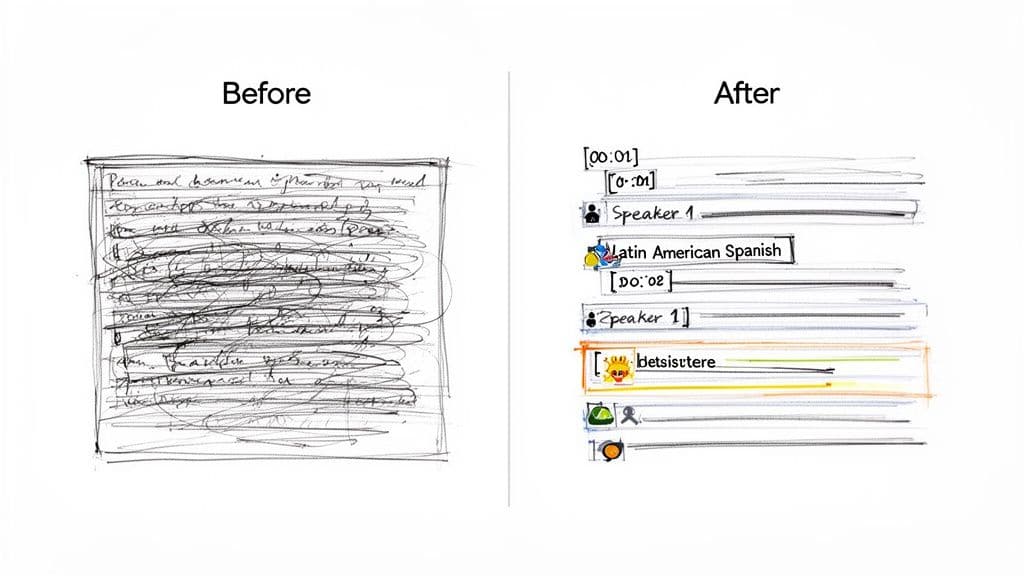
Incorporate Timestamps and Speaker Labels
Think of timestamps and speaker labels as the signposts of your transcript. They provide the essential context that makes the document searchable, scannable, and easy to navigate.
- Timestamps: These are markers that pinpoint the exact time a word or phrase was spoken. They are indispensable for jumping straight to key moments in the original audio or video, saving you from having to scrub through the file manually.
- Speaker Diarization: This is the technical term for identifying and labeling who is speaking at any given time. A great transcript will clearly mark each new speaker (e.g., "Speaker 1," "Maria," "Interviewer"), turning a confusing mess into a readable, script-like format.
For instance, a raw, unformatted transcript is barely usable:
Hola cómo estás muy bien y tú también gracias por venir de nada
But a properly formatted version is infinitely more valuable:
[00:00:01] Speaker 1: Hola, ¿cómo estás?
[00:00:03] Speaker 2: Muy bien, ¿y tú? Gracias por venir.
[00:00:05] Speaker 1: De nada.
This level of clarity is non-negotiable for anyone looking to analyze customer feedback, pull a quote from an interview, or create accurate subtitles.
Handle Dialects and Non-Verbal Cues
The Spanish language is incredibly diverse, with distinct accents, slang, and vocabulary stretching from Spain to Mexico to Argentina. A superior transcription process—whether manual or AI-driven—must be able to account for this rich diversity. Modern AI like Vatis Tech is trained on vast datasets covering numerous regional dialects, which helps ensure high accuracy no matter where the speaker is from.
But a great transcript goes beyond just the words. Capturing non-verbal cues adds a whole other layer of meaning.
A truly comprehensive transcript accounts for more than just speech. It includes notations for significant pauses, background noises, or emotional reactions that provide context unavailable from text alone.
Practical Example:
Instead of just writing the words, add context clues. This is how you capture the real feeling of a conversation:
- Simple: "No, no me gusta." (No, I don't like it.)
- Better: "[00:01:22] Ana: No, [pausa] no me gusta." (Captures hesitation.)
- Even Better: "[00:01:22] Ana: No, [risas] ¡no me gusta para nada!" (Captures sarcasm or humor.)
Consider adding simple notations like [risas] for laughter, [pausa] for a meaningful pause, or [sonido ininteligible] for any unclear audio. These small details are what separate a merely usable transcript in Spanish from a truly professional one.
Turning Your Transcript into Engaging Subtitles
You've got an accurate Spanish transcript. That's not the end of the road—it’s the perfect starting point. The text is all there, and now you can turn it into synchronized subtitles to boost engagement, improve accessibility, and even help your video’s SEO.
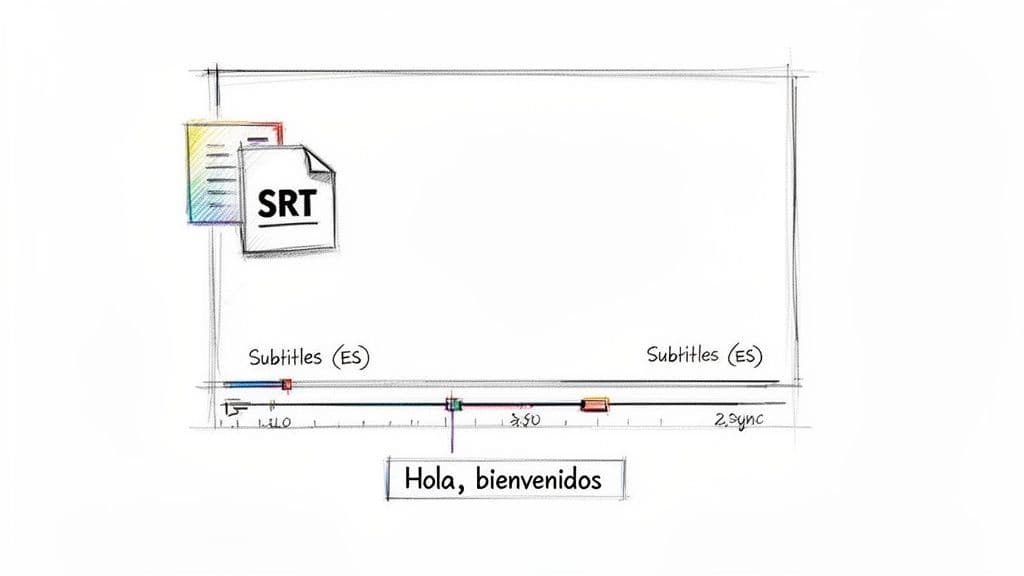
The trick is converting that plain text into a time-coded file like SRT (SubRip Text) or VTT (WebVTT). These aren't just text files. They contain timestamps that tell the video player exactly when to show each line of dialogue and when to make it disappear.
From Text to Timestamps: A Quick How-To
With a high-quality transcript in spanish from a platform like Vatis Tech, your next job is synchronization. Here are the steps:
- Generate a Transcript with Timestamps: First, ensure your transcript includes time information for each word or phrase. AI platforms do this automatically.
- Export as an SRT or VTT file: In your transcription tool, select "Export" and choose
.SRTor.VTTas the format. This file will contain the text broken down into timed chunks. - Upload to Your Video Platform: Upload the SRT/VTT file alongside your video on platforms like YouTube, Vimeo, or your website's media player. The platform will read the timestamps and display the subtitles correctly.
A much smarter approach is using a specialized tool. Once you have your Spanish text, you can use a dedicated Subtitle Generator tool to do the heavy lifting.
The real power of a transcript is its adaptability. A single, accurate text file can be repurposed into subtitles, blog posts, social media clips, and searchable archives, maximizing the value of your original content.
For anyone who wants to keep their workflow simple, Vatis Tech’s integrated subtitle generator handles the entire process, from transcription all the way to the final subtitle file.
Best Practices for Spanish Subtitles
Just syncing the text isn't enough. For Spanish-speaking audiences, you need to focus on readability. Here are a few solid guidelines to follow:
- Character Limits: Keep each line to a maximum of 42 characters. This stops the text from crowding the screen and makes it easy to read, whether on a big monitor or a tiny phone.
- Reading Speed: Stick to a comfortable pace of around 15-17 characters per second. This gives viewers enough time to read the text and watch the action without feeling rushed.
- Line Breaks: Always break lines at natural pauses in the language. Don’t split up names or phrases—it just feels clunky and disrupts the viewer’s flow.
By following these simple rules, you'll create subtitles that don't just make your content accessible but actually make it better for everyone watching.
Why Spanish Transcription Is a Business Superpower
Think of a transcript in Spanish as more than just a written record of a conversation. It’s a powerful business tool that can give you a serious edge, especially when you’re trying to connect with the massive and growing Spanish-speaking market. What used to be a 'nice-to-have' is now essential for any company that wants to operate effectively.
Take a modern contact center, for example. Transcripts of customer calls aren't just for looking back at what was said. They're gold mines of data for understanding customer feelings, spotting problems with products, and making sure agents are following the rules. This turns a simple support call into a source of real business intelligence.
Applications Across Key Industries
The need for high-quality Spanish transcription isn't limited to one area; its impact is felt across many different sectors. Smart companies are using transcripts not just to document what happened, but to analyze it, protect themselves, and innovate.
- Legal and Law Enforcement: For a law firm, a perfect transcript of a deposition with a Spanish-speaking witness is solid, undeniable evidence. It makes sure every single word is captured correctly for court, helping manage risk and build a stronger case.
- Media and Broadcasting: Media outlets depend on transcripts to check their broadcast content for compliance issues, build searchable archives, and quickly turn a news segment into a web article or social media post.
- Healthcare: In the world of telehealth, transcribing a patient consultation in Spanish creates an accurate medical record. This improves patient care and ensures nothing gets lost in translation between providers.
This isn't just a trend; the market numbers back it up. In Spain, the language translation software market—which is closely tied to transcription—was valued at $1.07 billion in 2024 and is expected to almost double by 2035. This huge growth points to a massive demand for accurate speech-to-text services. You can dig deeper into these language market projections to see the full picture.
Security and Compliance Are Non-Negotiable
When you're dealing with sensitive information—from customer PII to legal testimony—security is everything. A basic, off-the-shelf transcription tool just won’t do the job. You need a solution built with security and compliance at its core.
When your transcripts contain personal, financial, or legal information, choosing a secure provider is not just a best practice; it's a requirement for managing risk and maintaining trust.
Regulations like GDPR have made data protection a top priority. Any business that handles data from EU citizens has to make sure its entire transcription process is compliant. That means partnering with certified solutions like Vatis Tech, which offers end-to-end encryption, is fully aligned with GDPR, and is actively pursuing SOC 2 certification.
By choosing a secure platform, you ensure your valuable data stays safe while you uncover the strategic insights hidden in your audio and video. This is how transcription goes from being a simple task to a secure business superpower.
How to Create a Transcript in Spanish in 5 Minutes
So, you need a professional transcript in Spanish and you need it fast. Let's walk through just how easy it is to generate one with Vatis Tech. Forget spending hours manually typing or wrestling with clunky software. This whole process turns a major task into something you can knock out in minutes.
The entire workflow is built to be incredibly straightforward. You genuinely don’t need a technical background to get a high-quality, accurate transcript. Let's get started.
A 5-Step Guide to Your First Spanish Transcript
This is a hands-on tutorial that gets straight to the point. In just a handful of clicks, you’ll transform a raw audio or video file into a polished, usable document.
- Sign Up for a Free Trial: The first step is to create a free account. Vatis Tech gives you a trial that unlocks the platform’s main features so you can see it in action.
- Upload Your File: Once you’re logged in, just drag and drop your Spanish audio or video file right onto the dashboard. Alternatively, you can paste a URL from a site like YouTube.
- Select Spanish and Start Transcribing: Find and choose Spanish from the language options. The AI gets to work immediately, converting all the spoken words into text.
- Review and Polish in the Editor: The AI-generated text pops up in an interactive editor. This is where you can give it a quick once-over, fix any minor typos, and assign or correct speaker names.
- Export Your Final Transcript: Happy with how it looks? Just hit export. You can download the document in whatever format you need—TXT, DOCX, PDF, or even subtitle files like SRT and VTT.
And that's all there is to it. You now have a clean, accurate transcript in Spanish that’s ready for whatever you have planned, whether it’s creating new content, analyzing data, or making your media more accessible.
From Audio File to Actionable Content
This quick process is a game-changer for teams that need to repurpose content without wasting time. Think about it: a marketing team can take a Spanish-language podcast and have a full transcript in minutes. For a deeper dive on this, check out this great resource on Podcast to Transcript: A Practical Guide for Content Teams.
From that single transcript, you can pull quotes for social media, write a companion blog post, or generate accurate subtitles for video. The speed and simplicity of AI transcription mean you can squeeze maximum value out of every single piece of audio or video you create.
Frequently Asked Questions About Spanish Transcripts
Getting your Spanish transcripts right often comes down to a few key questions. Here are the practical, no-nonsense answers we give our clients to help them move forward with confidence.
How Accurate Is AI Transcription for Spanish?
Just how accurate is AI for Spanish? These days, surprisingly so.
Top-tier AI platforms like Vatis Tech consistently hit over 95% accuracy for Spanish transcription, putting them on par with human transcribers, especially when the audio quality is good. Our models have been trained on countless hours of audio from across the Spanish-speaking world, so they can deliver the precision needed for business, legal, and media projects.
Can I Transcribe a Video with Multiple Spanish Speakers?
Absolutely. Modern AI tools come with a feature called speaker diarization (or speaker detection).
Think of it like a scriptwriter for your audio. The AI automatically detects when a new person starts talking and labels them (e.g., "Speaker 1," "Speaker 2"). This is a game-changer for interviews, panel discussions, and webinars, as it turns a chaotic conversation into an organized, easy-to-read script.
What Is the Fastest Way to Get a Transcript in Spanish?
Hands down, AI transcription is the quickest route. There’s really no contest.
A professional human transcriber can take several hours—or even a few days—to turn around a one-hour file. An AI platform like Vatis Tech, on the other hand, will process that same hour of audio and have a full transcript ready for you in just a few minutes.
How Do You Handle Different Spanish Accents in a Transcript?
This is where the quality of the AI model really shows. The best ones are trained on enormous, diverse datasets that include accents and dialects from Spain, Latin America, and everywhere in between. This means the AI can understand and accurately transcribe a speaker whether they're from Madrid, Mexico City, or Bogotá.
But no AI is perfect. For those specific regional terms or names the model might miss, a simple built-in editor lets you click and make corrections in seconds. You always have the final say on the document's accuracy.
This blend of powerful AI recognition and easy-to-use editing tools is what ensures you get a polished, professional transcript every single time.
Ready to get a flawless transcript in Spanish in just minutes? Discover how Vatis Tech can transform your audio and video content into accurate, actionable text. Start your free trial today!
Produced via Outrank app