What Is WER in Speech-to-Text? Everything You Need to Know (2025)
Word Error Rate is (S + D + I) ÷ N. Worked example, the bands from excellent to unusable, 2025 scores for Whisper, Azure and Amazon, and how to lower yours.
8 min read
•
April 4, 2025
Written by
Adrian Ispas
Introduction
Imagine a call center where 30% of customer call transcriptions are wrong - missed words, incorrect phrases, and garbled sentences. This isn’t just frustrating; it’s costing the business valuable insights. The key to solving this lies in understanding Word Error Rate (WER), the gold-standard metric for measuring speech-to-text (STT) accuracy. In 2025, as STT powers everything from voice assistants to medical transcription services, knowing what WER is and how to use it can make or break your application. This guide covers WER’s definition, calculation, benchmarks, challenges, and practical applications, helping you choose and optimize the best STT system for your needs.
What Is WER (Word Error Rate)?
Word Error Rate (WER) measures speech-to-text accuracy by counting errors (substitutions, insertions, deletions) compared to a human-verified transcript. Lower WER percentages mean more accurate transcription. For example, a 5% WER indicates high accuracy suitable for most applications.
How Is WER Calculated? Step-by-Step
WER is calculated using the Levenshtein distance, which counts the minimum number of edits needed to transform the STT output into the reference transcript. The formula is:
WER = (S + D + I) / N × 100%
Where:
- **S (Substitutions):**Words in the reference replaced with incorrect words (e.g., "cat" → "hat").
- D (Deletions): Words in the reference omitted by the STT system.
-I (Insertions): Extra words added by the STT system that aren’t in the reference.
- N (Number of Words in Reference): Total words in the ground truth transcript.
Practical Example
Reference Transcript: "The quick brown fox jumps over the lazy dog." (N = 9 words)
STT Transcript:"The quick brown fox jump over a the lazy dogs."
Error Alignment Table:
- Substitutions (S):"jumps" → "jump", "dog" → "dogs" (S = 2).
- Deletions (D): No words were deleted (D = 0).
- Insertions (I): "a" was added (I = 1).
| Reference | STT Transcript | Error Type | Alignment |
|---|---|---|---|
| The | The | Correct | |
| quick | quick | Correct | |
| brown | brown | Correct | |
| fox | fox | Correct | |
| jumps | jump | Substitution | Incorrect |
| over | over | Correct | |
| the | a the | Insertion | Incorrect |
| lazy | lazy | Correct | |
| dog. | dogs. | Substitution | Incorrect |
WER Calculation:
WER = (2 + 0 + 1) / 9 × 100% = 3 / 9 × 100% = 33.33%
This means 33.33% of the words were incorrect - a high WER indicating poor accuracy.
A Visual Guide to WER in Transcription
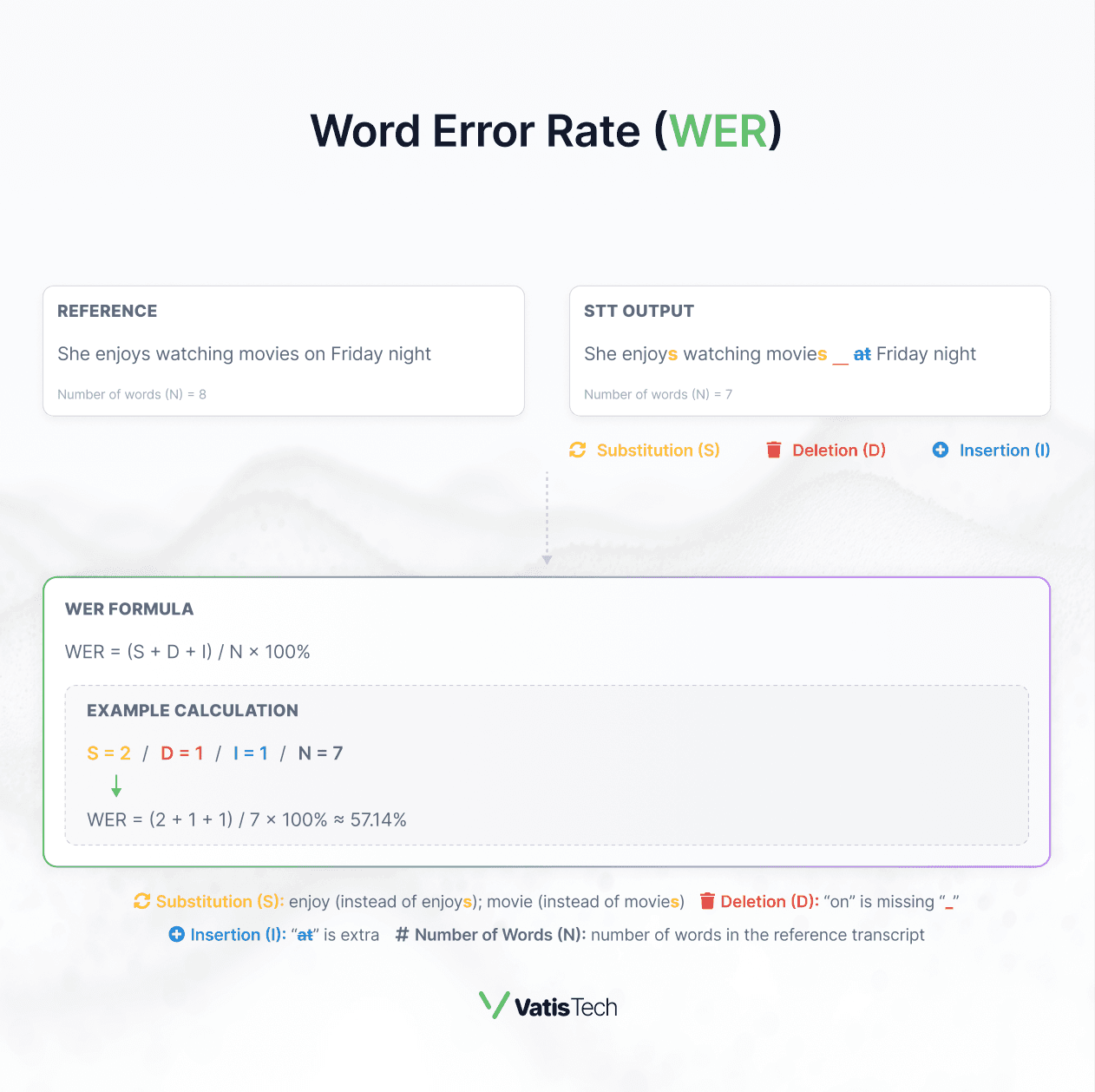
Source: Vatis Tech
Interpreting WER
What Is a Good WER for Speech-to-Text?
A WER of 0% is ideal but rare in real-world scenarios. Acceptable WER depends on several factors:
- Audio Quality: Clean audio (e.g., studio recordings) yields lower WER than noisy environments.
- Speaker Variability: Accents, speech speed, or disfluencies (e.g., "um," "uh") can increase WER.
- Use Case: High-stakes applications like medical transcription require lower WER than casual note-taking.
WER Benchmark (2025)
| WER Range | Interpretation | Typical Use Cases |
|---|---|---|
| < 5% | Excellent (Near-Human Performance) | High-quality dictation, closed captions |
| 5-10% | Very Good | Voice assistants (good conditions) |
| 10-20% | Good | Meeting transcription (clean audio) |
| 20-30% | Fair (May Require Significant Correction) | Noisy environments, some voice assistant |
| > 30% | Poor (Difficult to Understand) | Very challenging audio |
Real-World Example: In 2025, Amazon Transcribe achieves a WER of ~2.6% on LibriSpeech test-clean (a clean audio dataset), while IBM Watson Speech-to-Text scores ~10.9% on the same dataset, reflecting their performance differences.
Key Datasets for WER Benchmarking
When comparing speech-to-text (STT) systems, standard datasets ensure fair and consistent Word Error Rate (WER) results. These datasets mimic real-world audio scenarios, from clear recordings to noisy environments, and top STT systems are often tested on them to report their WER. Here’s a simple breakdown of the most popular datasets used in 2025, along with example WERs to show how systems perform:
-
LibriSpeech: A collection of English audiobook recordings, ideal for testing STT on clear, high-quality audio. It’s split into "clean" and "other" subsets, with the "clean" set being the gold standard for ideal conditions. For example, OpenAI Whisper Medium achieves a WER of ~3.3% on LibriSpeech test-clean - great for applications like podcast transcription.
-
Common Voice : Developed by Mozilla, this dataset features speech from volunteers around the world, encompassing a wide range of languages and accents. It’s ideal for evaluating how well a speech-to-text system handles speaker diversity. Due to this variability, WERs tend to be higher - Whisper Medium scores around 10.2%, while Vatis Tech performs better, scoring below 10%. This makes it a strong benchmark for global customer support scenarios.
-
Switchboard : Recordings of casual phone conversations, which are trickier due to natural speech patterns like pauses, "um"s, and background noise. WERs are typically higher here because of the conversational challenges, making it a realistic test for call center audio.
-
TED-LIUM : Audio from TED Talks, offering a mix of clear speech with some natural variations (e.g., different speaking styles). Azure Speech-to-Text, for instance, achieves a WER of ~4.6% on TED-LIUM, showing its strength for semi-formal audio like webinars or lectures.
-
CHiME Challenges : Designed to test STT in tough, noisy environments - like a crowded café or busy street. WERs often exceed 20% here, even for top systems, making it a critical benchmark for real-world noise scenarios.
Why WER Benchmarking Matters
The dataset you choose to test WER should match your use case. For clean audio like audiobooks, a WER of ~3.3% on LibriSpeech (like Whisper Medium) is excellent. But for noisy environments, you’ll want to look at CHiME results to see if the system holds up. Many datasets are publicly available, so you can test your STT system yourself - check out LibriSpeech or Common Voice to get started.
Practical Tools and Code to Calculate WER
Calculating WER manually is tedious, but tools and libraries simplify the process.
Python Example with `jiwer`
from jiwer import wer

reference = "The quick brown fox jumps over the lazy dog"
hypothesis = "The quick brown fox jump over a the lazy dogs"

error_rate = wer(reference, hypothesis)
print(f"WER: {error_rate * 100:.2f}%")  # Output: WER: 33.33%
Popular WER Calculation Tools
-
jiwer (Python Library): A lightweight and user-friendly Python library specifically designed for evaluating automatic speech recognition outputs, including WER, MER, and CER.
-
sclite (NIST Scoring Toolkit): A widely adopted command-line tool, particularly prevalent in speech recognition research, offering comprehensive scoring capabilities.
-
python-Levenshtein: A highly optimized Python library providing fast implementations of the Levenshtein distance algorithm, which forms the basis of WER calculation.
-
Hugging Face evaluate Library : Offers a convenient interface for calculating various metrics, including WER, with support for numerous datasets and integrations with popular machine learning frameworks.
Challenges in Calculating WER and How to Overcome Them
Accurate WER calculation requires careful handling of these common issues:
\1. Text Normalization Issues
Problem: Inconsistent formatting inflates WER (e.g., "5 dollars" vs. "$5", "Mr." vs. "Mister").
Solution: Normalize text before calculation: lowercase all text, standardize numbers (e.g., "5" to "five"), remove punctuation, and expand abbreviations.
from jiwer import transforms as tr
normalize = tr.Compose([
    tr.ToLowercase(),
    tr.RemovePunctuation(),
    tr.ExpandCommonEnglishContractions()
])
\2. Homophones and Near-Homophones
Problem: Words like "there" and "their" sound the same but count as errors.
Solution: Use a language model during STT decoding to improve context awareness. For evaluation, decide if homophones should be treated as equivalent based on your use case.
\3. Speaker Overlap in Multi-Speaker Audio
Problem: Overlapping speech in conversations increases WER.
Solution: Apply speaker diarization to segment speakers before transcription, improving accuracy.
\4. Ambiguous Word Boundaries
Problem: Languages like Chinese lack clear word spaces, complicating WER.
Solution: Use Character Error Rate (CER) alongside WER for such languages.
\5. Poor Reference Transcripts
Problem: Errors in the ground truth skew WER.
Solution: Use high-quality, verified transcripts, ideally cross-checked by multiple human transcribers.
Use Cases
WER is critical across various STT applications:
- Evaluating speech-to-text API Systems: Compare APIs like Google Cloud Speech-to-Text (~6.2% WER) vs. OpenAI Whisper (~3.3%) to select the best speech recognition accuracy tool.
- Quality Control: Call centers use WER to flag transcripts needing human review (e.g., >20% WER).
-Model Training: Developers minimize WER during STT model training to improve performance.
- Medical Transcription**:**A WER <5% ensures accurate patient records, where errors can be costly.
- **Voice Assistans:**A WER of 5-10% ensures reliable command recognition in smart devices.
Limitations of WER
Despite its importance, WER has drawbacks:
- Equal Error Weighting: A minor error ("a" vs. "the") counts the same as a major one ("cat" vs. "dog").
- No Semantic Understanding: WER ignores meaning—two transcripts with the same WER might differ in usability.
**- Punctuation Blindness:**WER typically excludes punctuation, which can affect clarity.
- Perceptual Quality: A lower WER doesn’t always mean a better user experience.
Beyond WER: Complementary Metrics
- Character Error Rate (CER): Measures errors at the character level, useful for languages like Chinese.
- Sentence Error Rate (SER): Percentage of sentences with any error, better for some applications.
- Real-Time Factor (RTF): Measures processing speed (e.g., 0.5 RTF = 30 minutes to process 1 hour of audio).
How to Reduce WER
To effectively reduce WER in speech-to-text systems, and improve overall speech recognition accuracy, consider the following approaches:
\1. Improve Audio Quality: Use noise-canceling microphones and record in quiet environments.
\2. Fine-Tune Models: Train STT models on domain-specific data (e.g., medical terms for healthcare).
\3. Leverage Language Models: Use advanced models like BERT or LLMs to improve context understanding.
4. Post-Processing: Apply text correction algorithms to fix common errors (e.g., homophones).
The Future of WER
As speech-to-text technology evolves, so does how we evaluate and improve accuracy. Here are the major trends shaping the future of Word Error Rate:
\1. Beyond Raw WER: Toward Contextual and Semantic Metrics
WER treats all errors equally - but not all mistakes are equally impactful. Researchers are exploring Meaning Error Rate (MER) and Semantic Error Rate (SemER) to better reflect comprehension rather than surface-level accuracy. Expect future evaluations to weigh critical vs. minor errors based on context.
\2. WER + LLMs (Large Language Models)
With the rise of LLMs like GPT-4 and beyond, STT post-processing is becoming more intelligent. These models can correct grammar, resolve homophones, and even infer missing context - significantly reducing perceived WER without retraining the acoustic model. Expect hybrid systems that blend ASR + LLMs for near-perfect readability.
\3. WER Customization for Vertical Use Cases
Industries like healthcare, legal, and media require domain-specific vocabulary and syntax. The trend is moving toward WER benchmarks tailored per industry - using datasets with jargon, dialogue structure, and acoustic conditions that reflect those verticals. This ensures benchmarks are truly relevant and actionable.
\4. Multilingual and Multimodal WER Evaluation
As global adoption of STT spreads, the need for WER in low-resource and tonal languages grows. Tools are evolving to handle multilingual benchmarks and even multimodal transcripts (e.g., syncing STT with video cues or speaker emotion).
\5. Real-Time WER Tracking in Production
Enterprises are starting to monitor WER in real time for production systems - using confidence scoring, speaker segmentation, and live corrections to dynamically adjust STT quality. This marks a shift from static testing to continuous WER monitoring pipelines.
Conclusion
Word Error Rate (WER) is the cornerstone of speech-to-text accuracy, guiding developers, businesses, and researchers in 2025. By understanding how to calculate WER, interpret benchmarks, and address its challenges, you can optimize speech recognition accuracy and choose the right speech-to-text API - whether it’s for a voice assistant, transcription services, or call center analytics.
Ready to put your knowledge into practice? Benchmark your STT system against trusted datasets like Common Voice, CHiME, TED-LIUM, LibriSpeech, or Switchboard, depending on your real-world use case. For example, if you're working with noisy phone conversations, LibriSpeech alone won’t cut it - selecting a dataset aligned with your actual audio conditions is key to accurately measuring performance. Once you're ready, start improving your transcription accuracy with Vatis Tech’s STT API,which opens with €10 of free credit.
Frequentely Asked Questions (FAQs)
Common Questions About WER in Speech-to-Text:
What does WER mean in speech recognition?
WER (Word Error Rate) measures the accuracy of a speech-to-text system by calculating the percentage of errors (substitutions, deletions, insertions) in the transcription compared to a reference.
What is a good WER for speech-to-text?
A WER below 5% is excellent for high-stakes applications like medical transcription, while 5-10% is good for voice assistants in clean conditions.
How can I calculate WER for my STT system?
Use tools like `jiwer` in Python or sclite, or Hugging Face evaluate Library to compare your STT output against a reference transcript, applying the formula WER = (S + D + I) / N × 100%.
What’s an acceptable WER for medical transcription?
Below 5% is critical.
Does WER measure punctuation errors?
No, typically excludes punctuation.
How to quickly reduce WER?
Improve audio, fine-tune models, and leverage context-aware language models.