HIPAA Compliant Transcription Software: A Practical Guide
What actually makes transcription HIPAA compliant: the BAA, the three safeguard categories, the questions worth asking a vendor, and the red flags.
16 min read
•
April 8, 2026
Written by
Adrian Ispas
A telehealth clinician finishes a morning of back-to-back visits. By lunch, there are hours of patient conversations waiting to be documented, reviewed, and entered into the EHR. Every recording may contain names, symptoms, medications, family history, and billing details. That is not just audio. It is regulated health data.
Many teams get stuck here. Manual transcription slows care delivery and burns staff time. Consumer transcription apps may be convenient, but convenience does not equal compliance. If a tool handles patient data without the right safeguards, the risk sits with the healthcare organization, not the app store listing.
That pressure is driving rapid adoption. The medical transcription software market was valued at $2.55 billion in 2024 and is projected to reach $8.41 billion by 2032, with a CAGR of 16.3%, driven by the need for accurate, compliant documentation that reduces administrative burden while maintaining regulatory standards, according to automated transcription market statistics compiled by Sonix.
Protecting Patient Data Your Introduction to HIPAA Transcription
HIPAA compliant transcription software is transcription software designed to process protected health information in a way that supports HIPAA privacy and security obligations. In plain language, it is not just software that turns speech into text. It is software that does that work while controlling who can access patient data, how it moves, where it is stored, and how its use is recorded.
What makes medical transcription different
A standard meeting transcription app usually focuses on speed and convenience. A healthcare transcription system has to do more.
It needs to handle patient conversations that may include sensitive diagnoses, medication names, insurance details, and follow-up instructions. It also has to fit real clinical workflows. A transcript that cannot be reviewed, corrected, and added to the chart safely is not very useful.
Three practical demands usually show up at once:
- Clinical pressure: Providers need documentation quickly so charts stay current.
- Compliance pressure: Privacy and security rules apply to the recording, the transcript, and often the metadata around them.
- Technical pressure: IT and developers must connect the tool to existing systems without creating new exposure points.
Why buyers get confused
Vendors often use phrases like “secure,” “encrypted,” or “HIPAA-ready.” Those terms can sound reassuring, but they do not tell you enough. A platform may offer strong security features and still fail your compliance needs if the legal and operational pieces are missing.
A better way to think about it is this. HIPAA transcription is not one product feature. It is a combination of legal agreements, security controls, access restrictions, workflow design, and operational discipline.
Tip: If your team is still building its overall compliance foundation, this practical guide to HIPAA compliance for small business is a useful companion resource for understanding the broader obligations around systems, vendors, and risk.
A simple example
Suppose a behavioral health practice records virtual sessions for note creation. A compliant workflow would need to secure the upload, restrict access to only authorized staff, track who opened the file, support review before finalizing the note, and define when the raw audio is deleted.
A noncompliant workflow might still produce a transcript. It just does so in a way that leaves patient data exposed.
That distinction matters. For business leaders, it affects liability and trust. For developers, it affects architecture choices from the first API call onward.
Understanding PHI and Business Associate Agreements
Before comparing vendors, get the vocabulary right. Most mistakes happen because teams buy software first and ask legal questions later.
What PHI means in transcription
Protected Health Information, or PHI, is information that can identify a patient and relates to that person’s health, care, or payment for care. In transcription, PHI can appear in more places than people expect.
It may be in the audio itself. A patient says their full name, date of birth, symptoms, and pharmacy. It may also appear in the transcript, file name, clinician notes, speaker labels, or attached metadata.
A useful rule is simple. If the recording or transcript can tie health-related information to a specific person, treat it as PHI.
Examples in a transcription workflow include:
- Patient identifiers: Name, phone number, address, date of birth
- Care details: Diagnoses, medications, treatment plans, symptoms
- Operational records: Appointment references, medical record numbers, billing discussions
Covered entity and business associate
A clinic, hospital, insurer, or similar healthcare organization is usually the covered entity. The transcription vendor is often the business associate because it handles PHI on the covered entity’s behalf.
Consider a bank using an armored transport service. The bank still owns the obligation to protect customer assets. But once the transport company takes custody, it also has defined responsibilities and cannot just say, “Security is the bank’s problem.”
That is why the contract matters so much.
Why the BAA is essential
A Business Associate Agreement, or BAA, is the legal document that defines how the vendor may use PHI, what safeguards it must apply, what happens if there is an incident, and what each party must do.
The critical point is this: a vendor cannot market itself as HIPAA compliant and stop there. A signed BAA is part of what makes the arrangement legally valid. If a vendor refuses to sign one, that is not a paperwork delay. It is a serious warning sign.
According to guidance summarized by 360 Transcription’s explanation of HIPAA-compliant medical records transcription, a signed BAA is legally mandatory to validate a HIPAA compliance claim for these services.
What to review in the agreement
Do not treat the BAA as a template to file away unread. Review how it handles:
- Permitted uses of PHI: What exactly the vendor may process
- Subprocessors: Whether other providers or cloud services are involved
- Incident response: How breaches or security events are reported
- Data return or deletion: What happens when the relationship ends
If your legal or procurement team wants a broader refresher, this detailed guide to HIPAA compliance gives helpful context on how agreements and operational controls work together.
Developers should also pay attention. The contract often needs to align with the vendor’s technical and processing terms. If your team is reviewing service terms alongside privacy obligations, the vendor’s data processing agreement is the kind of document that should be checked against the BAA, not considered a replacement for it.
Key takeaway: Security controls protect data in practice. The BAA defines responsibility in law. You need both.
Decoding HIPAA Safeguards for Transcription Software
At 6:40 a.m., a clinic manager uploads a physician dictation before the first patient arrives. By 6:41, that audio may have passed through a browser session, an API endpoint, a processing queue, temporary storage, a transcript editor, and an export workflow into the EHR. HIPAA safeguards matter at every one of those steps, not just where the final transcript is stored.
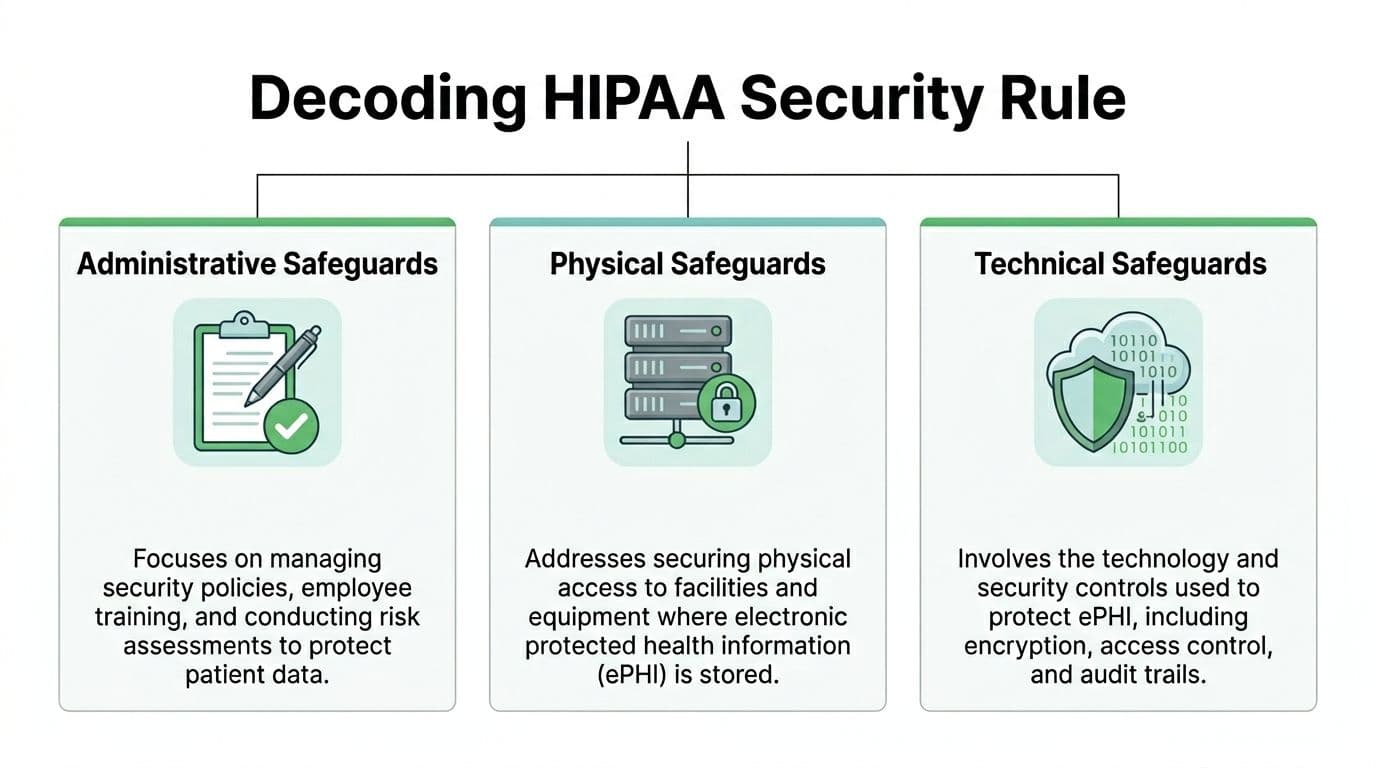
A useful way to read the HIPAA Security Rule is this: administrative safeguards decide who may do what, physical safeguards protect the systems that hold the data, and technical safeguards enforce those decisions inside the product. Business leaders need all three to reduce risk. Developers need all three because each category maps to design choices, infrastructure controls, and audit evidence.
Administrative safeguards
Administrative safeguards sit above the code, but they shape how the code should behave. They cover access approval, workforce training, risk review, incident handling, and change control.
For transcription software, this means the vendor should be able to explain how user access is granted, how permissions are reviewed, how support personnel are restricted, and what happens when an employee changes roles or leaves. A polished interface does not fix weak internal process. If credentials are shared, if support can open any customer record by default, or if permission reviews happen informally, the product carries avoidable exposure.
Least-privilege access is a good test. It works like issuing hospital master keys only to the few people who need them. A transcription reviewer may need to edit text for assigned encounters. That same reviewer usually does not need bulk export rights, tenant-level settings, or access to every historical patient file.
Physical safeguards
Cloud software can make physical risk feel invisible. It is still there.
The recordings, transcripts, backups, and admin tools all run on servers in real facilities, on real devices, under real operational controls. HIPAA expects those environments to be protected with controlled access, equipment safeguards, and documented procedures for handling hardware and media that may contain electronic protected health information.
If a vendor relies on third-party infrastructure, ask where the boundaries are. Which systems store uploaded audio? Where are backups kept? Who can access production systems from a workstation or laptop? A statement like “hosted in the cloud” leaves out the details your security team needs.
Technical safeguards
Technical safeguards are where compliance language turns into product behavior. This is the layer developers can test and buyers can request evidence for.
For a platform that handles clinical dictation, the baseline controls usually include encryption for data in transit and at rest, role-based access control, user authentication, session management, and audit logging tied to real events. If you are reviewing a HIPAA-ready transcription software platform, these are the controls that should appear not only on a security page, but in the architecture, the admin console, and the API design.
Encryption in transit and at rest
Encryption in transit protects data while it moves between browser, mobile client, API, storage layer, and connected systems such as an EHR. Encryption at rest protects stored audio, transcripts, backups, and cached or queued artifacts.
Ask specific questions, because broad claims hide weak spots:
- Is traffic protected with TLS for web sessions, uploads, downloads, and API calls?
- Are stored objects and databases encrypted with a strong standard such as AES-256?
- Are temporary files, processing queues, and export packages encrypted too?
- Are encryption keys managed centrally, rotated, and access-controlled?
Temporary storage causes frequent confusion. Teams often secure the final transcript but overlook the uploaded audio file waiting in queue, the processing copy created by the speech engine, or the export sitting briefly in object storage. From a HIPAA standpoint, those are not side details. They are part of the same PHI handling path.
Role-based access control
RBAC is how a written policy becomes an enforced boundary inside the application. Without it, “only approved users can access PHI” remains a policy statement instead of a system rule.
Good RBAC is specific. A clinician may read and sign transcripts for assigned patients. A scribe may draft and edit but not delete finalized records. An administrator may manage users and integrations without automatically seeing patient content. An auditor may view logs without changing transcript data.
Poor RBAC is usually easy to spot. Everyone with a login can search everything. Admin rights are bundled with content access. Service accounts have broad permissions that no one revisits. Those are implementation problems, not abstract compliance concerns.
Audit trails
Audit trails should answer a simple question with precision: who did what, when, from where, and to which record?
That means logging actions such as upload, view, edit, export, permission change, deletion request, API token use, and failed access attempts. The log should be tamper-resistant, time-stamped, and useful during a security review. A line that says “record updated” is rarely enough. A useful entry identifies the actor, object, action, and time so the event can be reconstructed later.
A practical test helps here. Ask the vendor to show log evidence for one ordinary workflow, such as a user exporting a transcript or an admin changing a role. If they cannot demonstrate that path clearly, the logging design may be too shallow for incident review.
The safeguards in one view
| Safeguard pillar | What it means in software | What a buyer should verify |
|---|---|---|
| Administrative | Policies, training, access governance, incident handling | Access approval workflow, role review process, workforce controls, documented incident procedures |
| Physical | Protected hosting environments and controlled facility access | Data center controls, device and workstation protections, backup handling, infrastructure oversight |
| Technical | Encryption, RBAC, audit logging, identity and session controls | TLS, encryption at rest, granular roles, per-action logs, authentication settings, evidence the controls are active |
Marketing language versus evidence
A serious vendor should be comfortable showing how safeguards work in practice. That can include architecture diagrams, admin screenshots, deletion workflows, access-control demonstrations, logging samples, and clear answers about where data lives during each processing stage.
Generic phrases such as “bank-grade security” do not tell you whether audio uploads are encrypted, whether support access is restricted, or whether every export event is logged. HIPAA evaluation gets more useful when you translate each legal safeguard into a product question, then into a technical verification step. That is the bridge between compliance theory and software implementation.
How to Vet a HIPAA Compliant Transcription Vendor
Once the legal foundation and safeguards are clear, vendor evaluation becomes much more practical. The goal is not to find the vendor with the nicest security page. The goal is to find the vendor whose product, process, and paperwork all support a safe clinical workflow.
A good review combines legal, security, operations, and product questions. If one group evaluates in isolation, gaps appear fast.
Start with workflow fit, not just compliance claims
Some platforms are secure enough for generic business audio but weak for clinical language. That matters because a secure transcript that consistently mishears medication names or symptoms still creates operational risk.
According to Skriber’s overview of HIPAA-compliant transcription software requirements, compliant transcription platforms require AI models trained on medical terminology to support clinical accuracy. The same source notes the importance of speaker diarization, EHR integration, mandatory MFA, and secure data centers such as SOC 2 Type II certified environments.
So ask a basic but often skipped question first: Was this system built for medical speech, or adapted from general meeting transcription?
The most useful vendor questions
Ask about the BAA early
Do this before procurement gets deep into pricing and implementation planning.
You want to know:
- Will the vendor sign a BAA?
- Who are its subprocessors?
- Does the BAA cover the full service, including support, storage, and integrations?
If the answer is hesitant, that tells you something.
Check identity and access controls
MFA should be available for all users and enforced for privileged accounts. Access should be role-based, and admin rights should be separated from day-to-day user access.
Ask for examples of role design. “We support roles” is too broad. You want to hear how the platform handles reviewer access, clinician access, developer access, and service accounts.
Test medical-language capability
A healthcare transcription system should handle specialty terms, acronyms, drug names, and multi-speaker encounters more reliably than a generic speech tool.
Good questions include:
- Can the model recognize medical vocabulary out of the box?
- Can custom vocabulary be added for specialties, clinicians, or local terms?
- How does the system separate speakers in a consultation or telehealth session?
Review integration paths
Many compliance issues show up during handoff, not transcription. The transcript may start in one secure system and end up pasted into email, downloaded to a local drive, or pushed into the EHR without audit context.
Check whether the platform supports clean integration patterns. If your team is comparing implementation options, looking at a dedicated transcription software product overview can help frame what to ask about APIs, deployment choices, and workflow features.
Use a checklist, not memory
Procurement calls blur together. A simple comparison sheet helps teams stay objective.
HIPAA Compliant Vendor Assessment Checklist
| Compliance Criteria | What to Ask/Verify | Vendor A | Vendor B |
|---|---|---|---|
| BAA availability | Will the vendor sign a BAA for the full service scope? | ||
| Medical-specific models | Is the AI trained for medical terminology and clinical language? | ||
| MFA | Can MFA be enforced for all relevant users? | ||
| RBAC | Are roles granular enough for clinicians, reviewers, admins, and auditors? | ||
| Audit trails | Are access, edits, exports, and deletions logged at action level? | ||
| Encryption | How is data protected in transit, at rest, and during processing? | ||
| Speaker diarization | Can the platform distinguish speakers in clinical encounters? | ||
| EHR integration | How are transcripts reviewed and sent into the medical record? | ||
| Hosting controls | Where is data processed and stored, and how is hosting governed? | ||
| Data deletion | How are retention and deletion handled for audio and transcripts? |
Red flags that deserve immediate attention
Some issues should move a vendor into the “no” pile quickly.
- No signed BAA: Without it, the compliance story is incomplete.
- Generic security answers: If the team cannot explain controls in plain language, implementation may be weak.
- Weak access control: Shared accounts, broad admin rights, or no MFA are bad signs.
- No clear deletion policy: Raw audio retention can become a major exposure point.
- Poor workflow answers: If the transcript cannot move safely into the EHR, staff will create risky workarounds.
Buyer mindset: Do not ask whether a platform is secure in the abstract. Ask whether it is secure for your exact workflow, users, and data handoffs.
Securely Integrating Transcription into Your Workflow
A compliant product can still be deployed in a noncompliant way. Most real exposure happens during upload, integration, retention, and access provisioning.
For developers and IT teams, the right question is not “Does the API work?” It is “Can we use the API without creating a new PHI handling problem?”
Design the data flow before writing code
Start by mapping the full lifecycle of the audio and transcript.
Where is the recording created? Who uploads it? Does it pass through a browser, mobile app, server, queue, and EHR interface? Where are temporary copies created? Who can retrieve them?
This exercise usually reveals weak points quickly. Common examples include local device downloads, long-lived temporary storage, debug logging with patient identifiers, and service accounts with overly broad permissions.
A safer architecture keeps the flow narrow and controlled.
A practical implementation pattern
- Authenticate the user strongly
Use identity controls that map to real workforce roles. Avoid shared service credentials in user-facing tools. - Protect API secrets
Store keys and tokens in a managed secrets system, not in client code or config files committed to source control. - Encrypt every transfer path
Use secure endpoints for browser and application traffic. If batch file transfer is needed, use secure transfer mechanisms rather than ad hoc file shares. - Separate processing from permanent storage
Treat uploads, processing artifacts, and final transcripts as different states with different controls. - Push into the EHR through approved interfaces
Avoid copy-paste workflows whenever possible. They break traceability and encourage local data sprawl.
Features developers should expect
For healthcare use, implementation details matter more than feature lists. A suitable platform should support things like speaker labeling, secure review, and structured output that can be consumed downstream.
This video gives a useful visual look at how modern transcription workflows can fit into operational systems:
Handle retention like a security control
Retention is often treated as a compliance footnote. It should be treated as an architectural decision.
Raw audio is especially sensitive because it carries full context, voice identity, and incidental disclosures. If your workflow only needs the final reviewed note, do not keep the raw recording longer than necessary. If the business does require retention, define where it lives, who can access it, and how deletion is logged.
A useful internal standard includes:
- Defined retention windows: Different rules for uploads, working transcripts, and finalized records
- Automated deletion jobs: Reduce dependence on manual cleanup
- Deletion logging: Preserve evidence that sensitive files were removed
- Export control: Limit uncontrolled copies on endpoints and shared drives
Build for review and correction
Speech-to-text in healthcare should not bypass human review. The system should make it easy for authorized staff to inspect transcripts, fix terms, validate speakers, and approve the final output before chart insertion.
That means your integration should preserve enough context for review without exposing more data than necessary. A read-only viewer for one role and an editor for another is often better than a one-size-fits-all access pattern.
Developer rule of thumb: If a user can do everything in the system, the system probably has too much permission by default.
Logging without leaking PHI
Operational logs are necessary. PHI in logs is not.
Keep audit events, timestamps, request identifiers, and processing status. Avoid logging transcript content, raw payloads, full file names containing patient names, or detailed exception output that reproduces sensitive records.
Engineering discipline meets compliance practice at this point. The safest system is not the one with the most features. It is the one that handles sensitive data deliberately from the first upload to the final deletion event.
Real-World Applications and Security Benefits
Healthcare is the obvious use case, but the underlying lesson is broader. Any team handling sensitive conversations needs the same combination of accuracy, access control, and accountability.
Healthcare uses
A clinic may use transcription for telehealth visits, physician dictation, behavioral health sessions, or care coordination calls. In each case, the transcript becomes more valuable when it is searchable, reviewable, and connected to the medical record.
Accuracy matters as much as security. In clinical transcription testing, median word error rates ranged from 7.6% for Rev to over 19% for other vendors, showing that a compliant vendor still needs close evaluation for documentation quality, according to research published in the National Library of Medicine archive.
If your team is exploring medical workflow examples, this medical transcription use case page shows the kind of operational scenarios organizations typically evaluate.
Legal and financial settings
Legal teams often transcribe interviews, depositions, internal investigations, and client calls. The confidentiality requirement may come from privilege, court obligations, or internal policy rather than HIPAA, but the control model looks similar.
Financial organizations face a comparable issue with advisory calls, complaint reviews, and regulated communications. They need transcripts people can search and review, but they also need strict control over who can access recordings and exports.
A practical benefit shows up fast in both industries:
- Better review workflows: Teams can search and annotate conversations without circulating raw audio widely.
- Stronger accountability: Audit trails help compliance teams confirm who accessed a transcript and when.
- Lower exposure: Controlled systems reduce the temptation to move sensitive files through email or consumer apps.
Research and internal investigations
Research teams working with sensitive interviews often need transcription that supports confidentiality commitments and careful participant handling. Internal investigation teams have similar needs when recordings involve employee allegations, legal risk, or reputational risk.
In both settings, a secure transcription environment helps separate operational access from broad organizational visibility. Only the people with a defined reason to review the material should be able to do so.
Operational lesson: High-security transcription is not only about avoiding penalties. It helps teams create cleaner, more governable records.
Common Questions on HIPAA Compliant Transcription
Is a popular AI transcription tool automatically HIPAA compliant
No. Brand recognition does not create compliance. If the service handles PHI, you need the right contractual, technical, and operational controls in place. A missing BAA alone can be enough to disqualify a tool for regulated healthcare use.
What is the difference between HIPAA eligible and HIPAA compliant
“HIPAA eligible” usually means a vendor offers features that could support compliant use in the right configuration. “HIPAA compliant” implies the legal agreement, safeguards, access controls, and operational setup are in place.
That difference matters. A capable platform can still be deployed incorrectly.
Is AI transcription good enough for medical use
Sometimes yes, but not without scrutiny. One unresolved issue in the market is the trade-off between speed and nuanced accuracy. According to SupaNote’s discussion of HIPAA-compliant transcription software, AI is faster and cheaper, but accuracy can drop 15% to 20% with non-English accents or complex jargon, and many vendors do not publish transparent benchmarks.
That means buyers should be cautious with multilingual, specialty-heavy, or noisy clinical settings.
Are human transcription services safer
Not automatically. Human review can help with difficult audio and nuanced terminology, but the service still needs the same privacy, access, and contractual controls. Human involvement changes the workflow. It does not remove compliance obligations.
What about open-source models like Whisper
Open-source models are not automatically noncompliant, but using them safely depends on how you deploy, host, monitor, and govern them. The model itself is only one piece. The surrounding infrastructure, retention behavior, access controls, and logging practices determine whether the implementation is safe for PHI.
Who is responsible if there is a breach
Responsibility depends on the facts, the BAA, the service architecture, and each party’s actions. A vendor’s involvement does not remove the covered entity’s responsibilities. That is why legal review, technical review, and implementation review all matter at the same time.
If your team needs a platform that supports secure speech workflows, developer-friendly APIs, and enterprise deployment options, take a look at Vatis Tech. It is built for organizations that need accurate transcription with strong operational controls, and it offers options for teams that want to move carefully from evaluation to production.