Tips on Editing AI Transcripts: Expert Guide 2026
Speaker labels, timestamps, punctuation, vocabulary, versioning, summaries, redaction and topic detection: the passes that turn a raw transcript into a record.
15 min read
•
May 24, 2026
Written by
Adrian Ispas
An AI-generated transcript lands on your desk. The words are mostly there, but the document still isn't usable. Speakers are blended together, punctuation is erratic, key moments are hard to find, and sensitive details are sitting in plain text.
That gap between "transcribed" and "ready" is where editing now lives. For transcript-heavy teams in media, contact centers, legal, healthcare, and research, editing isn't just cleanup. It's quality control, risk control, and usability work rolled into one. In statistical data work, editing is explicitly treated as a quality step for detecting inconsistencies, missing values, errors, and outliers before analysis, because better editing improves the reliability of what comes next, and the process is costly enough that teams formalize it rather than treating it as cosmetic cleanup (UNECE statistical data editing guidance).
That same principle applies to transcript work. If the raw text is wrong, hard to scan, or poorly governed, every summary, caption, report, quote pull, and compliance decision built on top of it gets weaker.
These tips on editing focus on AI-generated transcripts specifically. If you're also sorting out where editing ends and proofreading begins, this quick guide to choosing between editing and proofreading is a useful companion.
\1. Use Speaker Diarization to Identify and Label Multiple Speakers
The fastest way to make a transcript readable is to separate who said what. Without speaker diarization, a multi-person conversation becomes a wall of text that forces the editor to reconstruct the conversation manually.
That problem shows up everywhere. In a contact center call, a QA reviewer needs to distinguish the agent from the customer. In a legal deposition, counsel needs clear attribution before quoting a section. In a doctor-patient conversation, the wrong speaker label can change the meaning of the record.

What to fix first
Run diarization before you start sentence-level edits. Speaker boundaries affect punctuation, paragraphing, summaries, and even redaction decisions, so it's a mistake to polish wording before you've confirmed who is talking.
If your team is still getting familiar with the mechanics, this explanation of speaker diarization and how it works gives the technical foundation.
A practical pattern works well:
- Start with generic labels: Use Speaker 1, Speaker 2, and Speaker 3 until identity is confirmed.
- Rename only after confirmation: Change labels to Agent, Customer, Judge, Witness, Doctor, or Patient when the role is clear from context.
- Keep naming consistent: Don't switch between "Rep," "Agent," and "Support" in the same file unless they reflect different people.
Practical rule: If you're unsure who spoke a short unclear phrase, leave the uncertainty visible and flag it for review. Guessing creates cleaner-looking transcripts and worse records.
Where diarization usually breaks
Overlap, crosstalk, background noise, and similar-sounding voices are the usual failure points. Broadcast roundtables and call center escalations are especially messy because people interrupt each other and shift pace quickly.
Manual review should focus on turn changes, not every line equally. Check interruptions, agreement words like "right" or "yes," and any moment where one speaker finishes another person's sentence. Those are the places diarization tends to drift.
Done well, diarization turns editing from forensic reconstruction into structured review.
\2. Leverage Timestamps to Navigate and Reference Long Transcripts
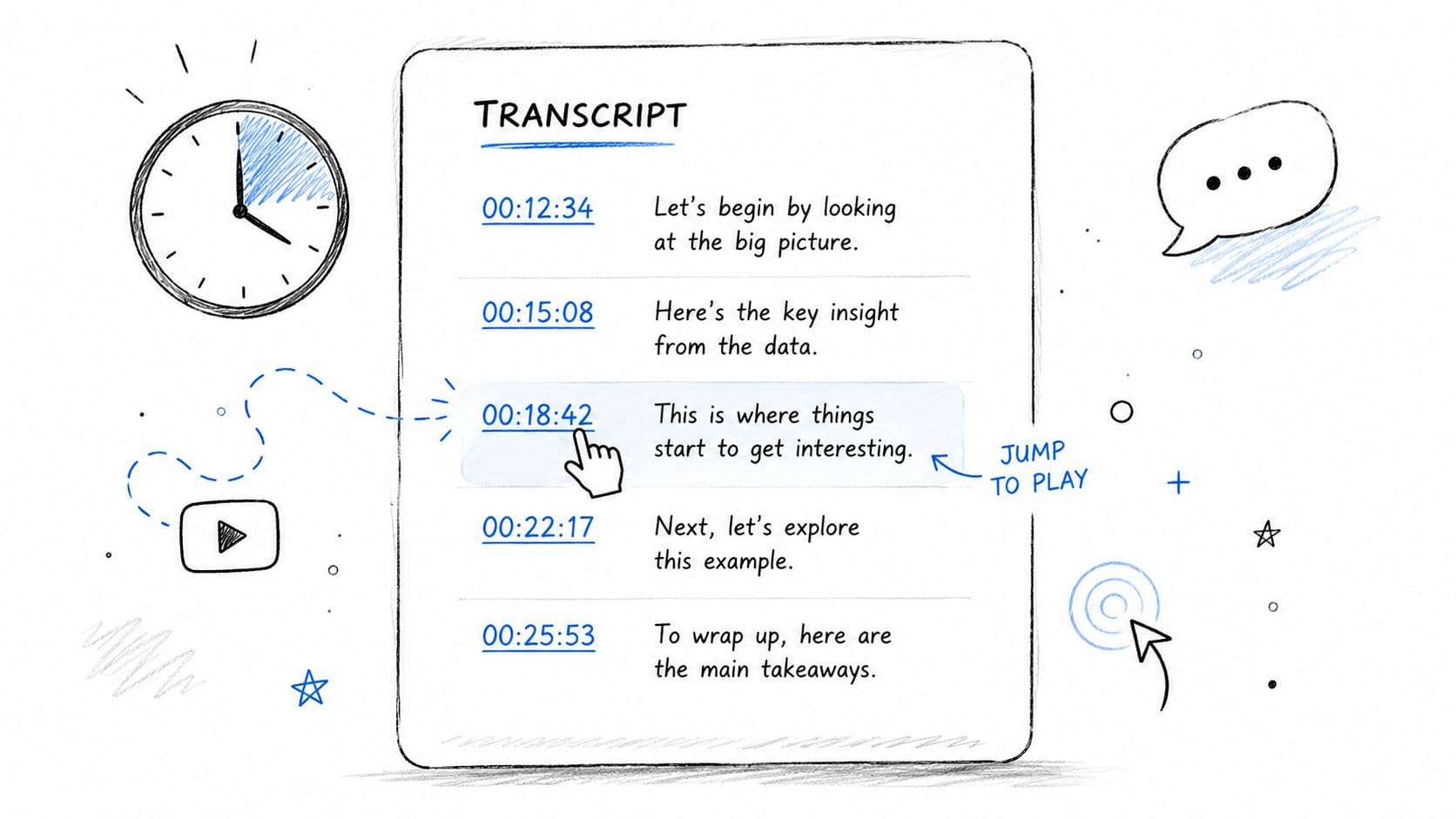
A long transcript without timestamps is searchable text, but it's not operationally useful. The editor can read it, yet nobody can jump to the exact second where a claim, escalation, admission, or quote occurs.
That matters most when the transcript has to serve more than one job. A journalist uses timestamps to verify a quote against source audio. A legal team uses them to cite an exact exchange. A producer uses them to build clips and subtitles from the same transcript.
Make timestamps useful, not decorative
Use a consistent format such as HH:MM:SS for review copies, especially when multiple teams touch the same file. For subtitle or caption workflows, preserve timing in export formats built for sync rather than flattening everything into plain text.
If you need a practical refresher, this guide on how to time stamp video covers the basics in a production-friendly way.
Here's where timestamps pay off in real work:
- For QA reviews: An operations manager can jump straight to the disputed part of a customer call instead of replaying the full recording.
- For depositions: A paralegal can attach a timestamped excerpt to internal notes before final citation formatting.
- For editorial review: A newsroom can tag moments that need fact-checking, cleanup, or legal review.
A transcript becomes much easier to trust when every important line can be checked against the underlying audio in seconds.
Build chapters around decision points
For long files, add chapter markers at meaningful breaks rather than arbitrary intervals. In a focus group, use discussion-topic changes. In a medical consult, use intake, history, assessment, and plan. In a sales call, use discovery, objections, pricing, and close.
That structure also supports accessibility work. Practical guidance around machine-generated captions is still thinner than it should be, even as accessibility expectations keep rising, and the broader accessibility ecosystem continues to emphasize captions that are synchronized, accurate, and include speaker identification where needed.
Timestamps are the backbone for all of that. They don't just help editors orient themselves. They help every downstream reviewer verify.
\3. Apply Automatic Punctuation and Formatting Corrections During Initial Review
Raw speech transcripts tend to flatten language. Questions lose their shape, sentence boundaries disappear, and a smart interview can look clumsy just because the text wasn't formatted into readable prose.
Automatic punctuation is the right first pass for that problem. It gives the editor structure quickly, but it shouldn't be trusted as a final authority, especially in interviews, testimony, or clinical conversations where a comma can soften or sharpen meaning.
Treat formatting as scaffolding
Use auto-formatting early so the transcript becomes readable enough to review at speed. Then inspect the places where punctuation changes intent, such as leading questions, interrupted answers, disclaimers, medication instructions, or conditional statements.
A few areas deserve extra skepticism:
- Questions versus statements: "You signed it?" and "You signed it." don't carry the same force.
- Lists and instructions: Clinical or technical speech often needs manual line breaks to stay legible.
- False sentence endings: Speakers pause mid-thought, and systems often insert full stops too early.
For teams handling machine-generated text at scale, this is where discipline matters. The UNECE's editing framework for official statistics treats editing as a structured quality-control process grounded in logic, common sense, and written procedure, not surface polish, and it recommends controls such as checking routing logic, cross-checking with other sources, and confirming approval status before data moves into analysis (UNECE statistical data editing methodology).
Create house style for transcripts
A transcript style guide saves more time than another round of manual cleanup. Decide how your team handles filler words, repeated starts, inaudible markers, interrupted speech, capitalization of titles, and whether nonverbal events like laughter or pauses stay in the final version.
A newsroom interview transcript and an evidentiary transcript shouldn't be cleaned to the same standard. One may allow light smoothing for readability. The other should preserve the speaker's language more faithfully.
Clean formatting helps people read faster. Over-formatting can quietly change the record.
If your editors keep debating the same punctuation issue file after file, that's not an editor problem. It's a missing standard.
\4. Implement Custom Vocabulary and Domain-Specific Terminology Recognition
Generic speech recognition struggles with specialized language. Product names, drug names, acronyms, court terms, regulation references, and internal jargon often come through close enough to fool a casual review and wrong enough to cause downstream trouble.
That makes vocabulary management one of the most impactful editing habits for professional transcript workflows. If your team repeatedly fixes the same words by hand, the system is telling you what it needs to learn.
Build from repeated corrections
Start with the terms your editors correct most often. In healthcare, that might include medication names, procedure names, clinician titles, and abbreviations. In legal work, it might be case names, Latin terms, or recurring witness names. In technical support, it could be product SKUs, feature names, and error strings.
The process is simple:
- Review edit history: Pull recurring word-level fixes from recent transcript reviews.
- Group by use case: Keep separate vocabulary lists for legal, contact center, medical, and editorial workflows when the language differs.
- Add pronunciation support where available: Hard-to-hear names and brand terms often improve when phonetic hints are supplied.
Think beyond nouns
Teams usually start with proper nouns, but verbs and shorthand matter too. Support teams may use internal abbreviations. Clinicians may compress phrases in speech. Journalists may refer to institutions by acronym in one segment and full name in another.
Generative AI is now embedded in real work processes at meaningful scale. In August 2024, almost 40% of U.S. adults ages 18 to 64 had used generative AI at least once, with 32.6% using it at home and 28.1% at work, while daily use among workers was higher at work than at home. The St. Louis Fed also estimated that between 0.5% and 3.5% of all U.S. work hours were currently assisted by generative AI (St. Louis Fed on rapid generative AI adoption).
For transcript editors, that means first-pass automation is already normal. The competitive edge isn't "using AI." It's tuning it to your language so human review starts closer to correct.
A custom vocabulary list won't remove the need for editing, but it does shift editing effort from repetitive correction to judgment-heavy review.
\5. Use Built-in Editors with Real-time Playback, Versioning, and Export Options
The best transcript editor isn't the one with the most buttons. It's the one that lets an editor hear, inspect, correct, compare, and export without breaking concentration.
When playback and text are synchronized, the review loop gets tighter. You click a line, hear the source, fix it, and move on. When the editor also preserves version history, teams can compare what changed between draft, reviewed, approved, and published outputs without relying on filename chaos.
A built-in review environment is especially useful when multiple stakeholders touch the same transcript. Legal review may preserve verbatim phrasing. Editorial review may prepare a publication-friendly version. Compliance may require a redacted export. Those shouldn't overwrite each other.
A practical editing sequence
Editors work faster when they use the same pass structure every time:
- First pass: Scan for speaker labels, obvious word errors, and formatting failures.
- Second pass: Review against audio where meaning, attribution, or compliance risk is involved.
- Third pass: Export by audience, such as TXT for search, DOCX for editing, PDF for recordkeeping, or subtitle formats for media delivery.
Here is a useful reference point for what a synced workflow looks like in practice:
Versioning matters more than most teams think
The hardest editing decision often isn't what to change. It's when to stop changing. That restraint problem is increasingly important in modern post-production and transcript workflows, especially where over-editing can weaken evidentiary trust, factual clarity, or auditability.
A versioned editor helps because it separates review stages cleanly. You can preserve a near-verbatim source transcript, create a readable working edit, and then generate audience-specific outputs without losing the chain of changes.
For newsroom, healthcare, legal, and compliance teams, that separation is protective. It lets you improve usability without pretending every polished version is the original record.
\6. Generate Automatic Summaries and Chapters for Long-Form Content Navigation
Long transcripts are valuable and hard to use. A two-hour interview, hearing, discovery call, or clinical recording may contain exactly what the team needs, but nobody wants to re-read the full text just to find the important parts.
Automatic summaries and chaptering solve that access problem first, not the accuracy problem. That's the right order to remember. A summary is a map, not the territory.
Use summaries to triage review
For long files, generate an initial summary before full manual review. This helps an editor or stakeholder decide where close listening is required. In a customer support environment, the summary may reveal the reason for contact, escalation point, and resolution. In a legal workflow, it may highlight disputed sections or admissions that need direct verification.
A useful practice is to pair summaries with linked timestamps. That gives the reader a fast route from "what happened" to "show me where."
Summaries are most useful when they reflect the structure of the conversation:
- Contact centers: reason for call, actions taken, outcome
- Healthcare: history, symptoms discussed, care plan
- Research interviews: themes, quotations to verify, emerging patterns
- Broadcast interviews: topic shifts, notable remarks, usable clips
Keep human review close to the source
Don't let a strong summary replace transcript review in sensitive work. Summaries compress nuance, and compression can blur ambiguity, hesitation, or disagreement that matters.
This is also where current usage patterns are revealing. A 2026 Federal Reserve survey found work-related generative AI adoption at about 41% of the workforce, while 78% of the labor force works at firms that have adopted AI and 54% works at firms using LLMs. The same report notes that frequent users often keep AI use to relatively small time blocks, which points to a practical truth for editing workflows: embedded precision features tend to fit better than workflow-replacing interfaces (Federal Reserve note on AI adoption in the U.S. economy).
That matches real transcript work. Editors don't need a sweeping rewrite machine. They need fast orientation, good boundaries, and one-click return to the source.
\7. Implement PII Redaction and Data Masking for Compliance and Privacy
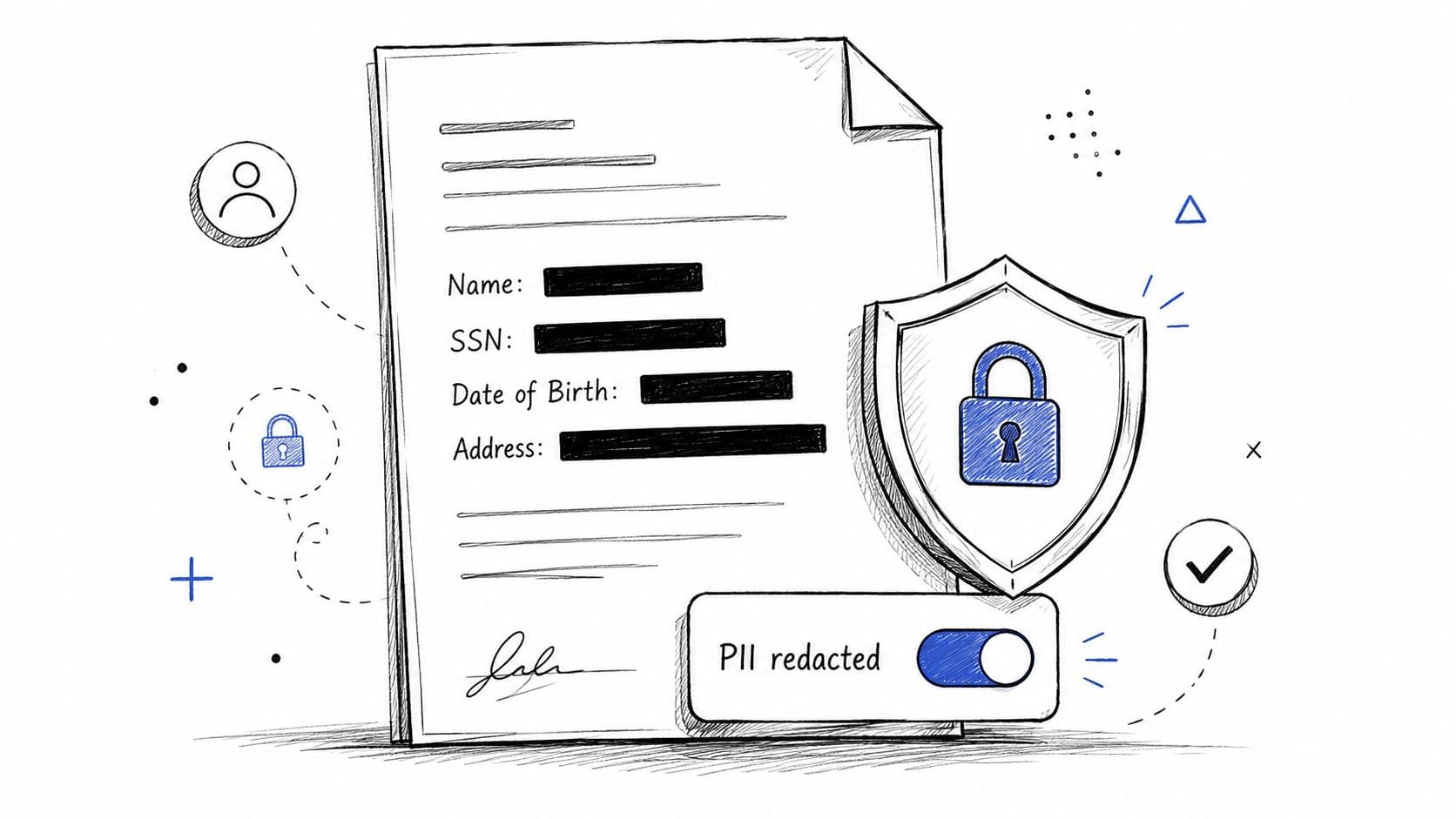
A transcript can become a liability the moment it leaves the immediate review context. Names, phone numbers, addresses, account details, emails, and health identifiers often appear in exactly the transcripts people are most eager to share internally.
That means privacy editing can't be an afterthought. If redaction happens only at export time, sensitive data usually survives too long in too many places.
Redact early, reveal selectively
A strong workflow masks likely PII by default and only exposes unredacted text to authorized reviewers when the role requires it. That approach works well in contact centers, healthcare, financial services, and legal intake because it limits casual visibility.
In practice, this often looks like:
- Default masking: Hide common identifier types during initial review.
- Role-based access: Let supervisors, compliance leads, or case owners view unredacted content when needed.
- Audit-friendly handling: Preserve a review trail showing when sensitive content was exposed or changed.
Don't rely on pattern matching alone
Automatic redaction is useful, but context still matters. A number may be a phone number, an invoice number, or part of a dosage discussion. A name may refer to a patient, a physician, or a public official. Human review should focus on disclosure risk, not just recognition.
This issue has become more urgent as teams use AI transcription, auto-captions, and multilingual subtitles more broadly. Practical guidance still lags on how to verify and govern machine-generated text, especially around names, accents, code-switching, and domain jargon, even as caption accuracy expectations keep getting more attention.
The cleanest workflow is the one where most reviewers never need to see the sensitive data in the first place.
Good redaction doesn't just protect the final transcript. It protects the editing process itself.
\8. Integrate Sentiment Analysis and Topic Detection for Business Intelligence and Quality Insights
Not every transcript needs analytics layered on top of it. But when you're processing calls, interviews, support conversations, or research sessions at scale, topic and sentiment signals help editors and operators decide which transcripts deserve human attention first.
The key is to use those signals as routing aids, not verdicts. Sentiment is often fragile around sarcasm, mixed emotions, hesitation, or domain-specific language. Topic detection is stronger when categories are tightly defined and vocabulary is tuned to the environment.
Use analytics to prioritize review
In a contact center, sentiment can flag calls where frustration rose sharply. In a product research interview, topic detection can cluster feedback about onboarding, pricing, bugs, or missing features. In legal or compliance review, topic tags can identify sections discussing key issues before a reviewer reads every line.
If you're evaluating API-level options, this overview of speech-to-text sentiment analysis APIs in 2025 is a practical starting point.
A strong pattern is to combine transcript analytics with human escalation rules:
- Flag negative turns for review: Let supervisors inspect the underlying exchange before acting.
- Track topics by speaker: Separate what customers complain about from what agents promise.
- Use trend data carefully: Analytics can surface patterns, but transcript review should confirm what happened.
Keep the editor in the loop
The editor's role doesn't disappear when analytics arrive. It gets sharper. Someone still has to check whether the flagged segment reflects real dissatisfaction, whether the topic tag matches the conversation, and whether a summary or report fairly represents the underlying exchange.
That discipline matters because editing has always been about improving reliability before analysis. When a transcript becomes the source layer for dashboards, quality scoring, or operational reporting, small textual errors stop being small.
Used well, sentiment and topic detection don't replace editing. They help the editor decide where judgment matters most.
8-Point Editing Features Comparison
| Feature | Implementation complexity | Resource requirements | Expected outcomes | Ideal use cases | Key advantages |
|---|---|---|---|---|---|
| Use Speaker Diarization to Identify and Label Multiple Speakers | Medium–High: speaker separation models and tuning; optional enrollment | Moderate CPU/GPU, quality audio, training/enrollment data | Speaker-attributed transcripts and clearer conversation boundaries | Contact centers, legal depositions, multi-person interviews, healthcare consultations | Automates speaker labeling, improves readability and speaker-level analytics |
| Leverage Timestamps to Navigate and Reference Long Transcripts | Low–Medium: timestamp sync and formatting logic | Minimal extra compute; accurate audio/video sync required | Clickable time anchors, precise references, subtitle-ready output | Long-form media, legal evidence, captioning, journalism | Fast navigation, precise citations, subtitle compatibility |
| Apply Automatic Punctuation and Formatting Corrections During Initial Review | Low: punctuation models applied post-ASR | Low compute; punctuation/capitalization models and rules | Readable, formatted transcripts with reduced manual editing | Contact centers, journalists, healthcare, legal drafts | Speeds editing, ensures consistent formatting, improves readability |
| Implement Custom Vocabulary and Domain-Specific Terminology Recognition | Medium: build and integrate vocab lists; ongoing maintenance | Moderate effort to create/update lists; possible minor latency if very large | Fewer terminology errors, higher domain accuracy, consistent naming | Healthcare, legal, finance, technical support, specialized media | Improves term recognition, reduces repeated corrections, boosts entity extraction |
| Use Built-in Editors with Real-time Playback, Versioning, and Export Options | Medium: UI, synchronized playback, versioning and export features | Moderate–High: storage for versions, responsive UI, audio playback resources | Faster verification, collaborative edits, multi-format exports | Legal review, publishing, QA workflows, collaborative teams | Synchronized audio context, version control, streamlined exports |
| Generate Automatic Summaries and Chapters for Long-Form Content Navigation | Medium: summarization and topic-detection models with tuning | Moderate NLP compute; subject-matter review recommended | Executive summaries, chapter markers, quicker content assessment | Research, long interviews, contact center reporting, broadcasts | Speeds review, organizes content, improves discoverability |
| Implement PII Redaction and Data Masking for Compliance and Privacy | Medium–High: detection rules, compliance mapping, multilingual handling | Moderate: redaction models, audit logging, RBAC, testing | Masked sensitive data, compliance support, reduced exposure risk | Healthcare (HIPAA), finance (PCI/SSN), legal, contact centers | Automated privacy protection, audit trails, regulatory compliance |
| Integrate Sentiment Analysis and Topic Detection for Business Intelligence and Quality Insights | Medium: sentiment/topic models and taxonomy customization | Moderate compute, training/tuning data, BI integration | Emotion scores, topic classification, trend and risk signals | Contact centers, CX teams, product feedback, quality assurance | Flags at-risk interactions, delivers actionable insights and trends |
Transform Your Workflow with Intelligent Editing
A reviewer opens a 90-minute interview transcript five minutes before a legal check. Speaker labels are wrong, a client name appears in full, and no one can jump from the summary back to the exact line in the audio. Editing decisions made earlier in the workflow now determine whether that transcript is useful, defensible, and safe to share.
Strong transcript editing turns machine output into an operational record that teams can search, cite, export, audit, subtitle, summarize, and protect. Grammar matters, but transcript teams usually lose more time to speaker confusion, missing timing references, inconsistent terminology, and privacy cleanup than to stray commas.
The advantage lies in treating editing as a system. Speaker diarization improves readability. Timestamps support verification and citation. Formatting speeds review. Custom vocabulary cuts recurring corrections in technical or regulated fields. Versioned editors create a traceable review path. Summaries and chapters reduce time spent scanning long files. Redaction limits exposure. Topic and sentiment signals help teams prioritize what needs human attention first.
Restraint matters too.
In legal, medical, journalistic, and compliance-heavy work, aggressive cleanup can distort the record. Removing hesitations, interruptions, overlaps, or uncertainty markers may make the page look cleaner while weakening the value of the transcript for audit, evidence, or quality review. The standard is not elegance. The standard is accuracy, usability, and fitness for the job the transcript needs to do.
That is the same logic used in other forms of data editing. Errors caught early stay contained. Errors left in the source spread into caption files, summaries, pull quotes, QA reports, and downstream analysis. Transcript editing has the same dependency chain. If the transcript is unreliable, every asset built from it inherits that weakness.
A better workflow fixes repeatable problems at the process level. Set rules for speaker labels and timestamp format. Define style choices for filler words, inaudible segments, and crosstalk. Maintain approved terminology for products, acronyms, and proper nouns. Require versioned review on high-risk transcripts. Redact sensitive data before broad distribution. Use summaries and analytics to sort and route work, then verify against the source audio when meaning or liability is at stake.
AI tools fit best inside that review loop, not outside it. Teams editing transcripts for publishing, compliance, customer research, or QA rarely need a general chat prompt to rewrite everything. Features such as synchronized playback, redaction controls, diarization repair, summary generation, and flexible exports cut manual effort while keeping accountability with the reviewer.
If your team handles transcripts at scale, a platform like Vatis Tech can support that model because it combines transcription, a built-in editor, speaker labeling, timestamps, summaries, chapters, export formats, and API-driven features in one environment. The value is practical. Editors start from a better draft, reviewers work in a more controlled system, and technical teams can connect transcript output to existing workflows.
For a broader operations lens on automation choices, this explainer on IPA versus RPA explained is worth reading alongside your transcript workflow planning.
Start with one change that removes friction every day. For many teams, that is cleaner diarization, stricter timestamp rules, or automatic PII masking by default. Once those controls are in place, editing becomes faster because the workflow supports the editor instead of creating more cleanup work.
If you want to turn raw audio and video into editable, searchable transcripts with speaker diarization, timestamps, summaries, redaction, and API access, explore Vatis Tech and test how it fits your team's review workflow.